

Two licensed operators, one building, and a router that either works on day one or does not. This home internet Dubai guide covers du versus e&, how to check what reaches your address, fibre speeds, contracts and installation, with every number dated 29 October 2026.
The router arrives, the technician leaves, and the Wi-Fi light stays stubbornly red. Then you learn the fibre in your building was never switched on for your unit. It is a small, avoidable disaster, and it often starts with choosing a brand before checking the building. Short version: check the building first.
For home internet Dubai households choose between just two licensed operators, e& and du, yet the decision rarely hinges on the logo. This guide shows how to check what reaches your address, how to read contract length and exit charges, and what to expect on installation day. Sorting those before you sign can save you from paying for speed your flat cannot use.
Home internet Dubai households can buy from two licensed operators, e& and du, and the decision rarely comes down to the brand. It comes down to a duller question: whose fibre is live in your building, and is it switched on for your unit? Settle that first, then compare price, contract length and exit charges. Speed tiers, TV bundles and promotions come after.
For an apartment, the default is fibre on a 12-month commitment. The e& Neo plan lists AED 399 a month before 5% VAT (AED 319 under an online offer for three months), up to 1 Gbps, with typical speeds of 900 to 940 Mbps over an Ethernet cable. Leaving early costs the lower of AED 1,000 or one month, plus any device balance. If fibre is not available, 5G home wireless is the fallback: e& Home Wireless lists AED 206 to 299 a month on 12 or 24 months, with no installation visit.
We could not read du’s home plan pages, so this guide gives no du prices and shows you how to compare a du quote against the e& terms. Order after your tenancy paperwork exists, ask the five contract questions in the contracts section, and test the line on installation day before the technician leaves.
This home internet Dubai guide is desk research. DubaiEveryday.com has not had a line installed, timed a technician or tested a router, and nothing here describes a personal experience. The scenarios are worked examples built from published terms, and they are labelled as illustrative.
On 29 October 2026 we read the e& Neo plan page, the e& Home Wireless page and its Giga 5G page, plus regulator pages from the Telecommunications and Digital Government Regulatory Authority (TDRA) and the UAE government portal. Plan prices come from operator pages and move with promotions.
What we could not check: du publishes its home plans on pages that block automated readers, so we have no du prices, speeds or contract terms and we do not guess them. We also could not run any address check, because neither operator exposes one that we could read. Inclusion was not paid for, nobody paid for placement, and we use no affiliate links. This is general information, not individual consumer-law advice.
How home internet Dubai service works, and where this guide stops
Two companies hold the licences that matter for a home internet Dubai line: e& (formerly Etisalat) and du. The regulator, TDRA, lists both as licensees, and its 12 August 2026 announcement says their renewed licences run from 9 August 2026 to 8 August 2046. For you, that means the home internet Dubai market is stable, regulated and small. There are two doors, and you pick one per address.
The same TDRA announcement says household fibre penetration is 99.7% and that the UAE ranks first globally on that measure for the tenth consecutive year, citing international indicators. Treat the figure as a statement about the country, not a promise that home internet Dubai service will reach your flat. It tells you fibre is common. It does not tell you whether the riser in your tower reaches your floor, or whether a socket exists in your living room.
The chain from street to sofa
A home internet Dubai fibre connection is a chain, and each link can fail separately. A cable runs from the operator’s network to the building, usually into an entry or telecom room. From there a riser carries fibre up the tower to each floor. Inside your unit, a wall socket or a small box converts light into a network cable, and a router turns that cable into Wi-Fi. Your devices connect to the router.
When something goes wrong, the useful question is “which link?” A fault in the street affects many flats. A missing socket affects only yours. A router in a cupboard affects only the bedroom. We return to this chain in the availability, installation and Wi-Fi sections, because most home internet Dubai complaints turn out to be about the last link, not the plan.
What this guide covers, and what it hands over
This page has one job: choosing, ordering, installing and keeping a fixed home internet Dubai line, with du versus e& as the central comparison. Mobile SIMs, eSIMs, number portability, UAE PASS, payments and scam texts live in our Dubai internet and mobile guide, which also introduces home plans briefly. Here we go much deeper on home internet Dubai service and skip the rest.
Utilities are a neighbouring job. Water and electricity connection through DEWA, Ejari and the first-week order of tasks belong to the home setup guide, and the DEWA step specifically is covered in the DEWA move-in guide. We mention them only where they change the order of your internet order.
A small glossary you will actually use
Mbps and MB/s
Operators quote megabits per second (Mbps). File sizes and download bars usually show megabytes per second (MB/s). Divide Mbps by eight for a rough MB/s figure.
Covered and enabled
“Covered” means the operator’s network is near you. “Enabled” means your unit can be switched on. The e& Giga 5G page itself says enabling a home can take up to six months.
MRC and exit charge
MRC is the monthly recurring charge. The exit charge is what you pay to leave before the minimum term ends. On e& Neo it is the lower of one MRC or AED 1,000, plus device balances.
Router and socket
The socket (or small converter box) is where fibre becomes a cable. The router is the Wi-Fi device. They are often different pieces of kit, and only one of them is yours to move.
Who needs this guide, and who does not
You need this home internet Dubai guide if you are signing a tenancy, moving between flats, buying a home, or finding that the flat you inherited has a line nobody understands. You do not need it for a stay of a few weeks. A hotel or serviced apartment includes Wi-Fi, and a visitor line or eSIM covers the phone. If you are planning a short trip, the Dubai travel guide is the better starting point.
The guide is also not the right place to settle disputes with a landlord about whether a tenant may install a line, or what happens to a unit that has none. Those are tenancy questions, and we point to the tenant rights guide where the line blurs. Our job here is the telecom side of home internet Dubai: what to ask, what to read and what to keep.
du vs e&: what you can compare, and what you cannot
Every home internet Dubai search ends up at this comparison, so here is the honest version. e& publishes full terms for its home internet Dubai plans, and we read them. du’s home pages could not be read by our tools, so we have no verified du price, speed tier or exit charge to put beside them. A table that invented the du column would look tidy and be worthless. What follows instead is a method that works with whichever numbers you collect.
One fact does favour a neutral reading. Both companies are licensed for fixed, mobile and internet services until 2046, and both publish network coverage maps that include fibre, according to the government portal’s telecom page. Neither is a fringe home internet Dubai option, and neither is the “safe” one by default. The right operator is the one that can serve your unit on terms you have read.
The terms e& prints, side by side with the du questions
The table below lists what we verified on the e& pages and the matching question to put to du. Where a cell says “Ask”, it means we have no source. Fill the right-hand column from a written du quote, not from a chat, a forum post or a friend’s memory of what the plan used to cost.
| Term | e& as published (29 Oct 2026) | du: ask for it in writing |
|---|---|---|
| Headline fibre plan | Neo: AED 399/month list, AED 319 for three months online offer, excluding 5% VAT | Plan name, speed, monthly price and what the promo price becomes afterwards |
| Speed | Up to 1 Gbps; typical 900 to 940 Mbps on Ethernet with e& equipment | Is “up to” the same as “typical”? Which cable and router does the figure assume? |
| Minimum term | 12 months (Neo), 12 or 24 months (Home Wireless), 24 months (Giga 5G) | Months, and whether a longer term lowers the price |
| Exit charge | Lower of one MRC or AED 1,000, plus device charges | The formula in AED, and the device-balance rule |
| Installation fee | Not stated on the Neo page | Fee, or “free”, and whether a visit is needed |
| Router | e& router included; Wi-Fi 7 router AED 22.5/month for 24 months | Included model, upgrade cost, and own-router policy |
| Moving home | Fibre: “Home move” page, no fee stated. Home Wireless: one free move a month, then AED 100 | Transfer fee, lead time and whether the term restarts |
| Discounts | 50% off the monthly charge with a valid Ministry ID for People of Determination (Neo page) | Whether an equivalent discount exists |
du’s site did not allow our tools to read its home plans, so every du cell is a question. If you see a du figure quoted on a blog or a social post, treat it as unconfirmed until du shows it on a quote, a checkout page or a contract. The same goes for any e& figure older than the date on this page.
Home internet Dubai: a fair way to compare two quotes
For a fair home internet Dubai comparison, ask both operators for the same package: unlimited home fibre at the speed you need, no TV bundle unless you want it, standard router, 12-month term. Then write the answers into one sheet. The numbers that decide the contest are never the monthly headline alone.
- Monthly price after the promotion ends, excluding and including 5% VAT.
- Number of months the promotion lasts, and the month it starts. e& Neo’s discount starts from the second month, which makes the first bill unclear.
- Installation or activation fee, in writing, even if the answer is “free”.
- Router and any add-on devices: monthly fee, number of months, and the charge if you leave early.
- Minimum term and the exit formula, with a worked AED example for month 4 and month 9.
- What happens when you move: transfer, cancel, or both, and what each costs.
Then compute a twelve-month home internet Dubai total for each, as we do in the contracts section. The cheaper headline often loses once the router, the first-bill quirks and the exit rules are added. If the totals are within a few hundred dirhams, break the tie on something else: the lead time to get connected, the way support is reached, and whether the contract fits how long you expect to stay.
What speed-test rankings can and cannot tell you
Public speed-test indexes publish fixed-broadband medians for the UAE and sometimes for individual operators. We could not read the Ookla index page today, so we quote no figures from it. As a matter of method, treat any operator ranking cautiously. A median depends on which plans people tested, which routers they used, how many tests ran over Wi-Fi, and when. It describes a population, not your floor of your tower.
For a single household, the more useful evidence is local and boring: the same building, the same operator, a neighbour on a similar plan. If your building has a residents’ group, one question there (“Which operator’s fibre did you get, and how long did installation take?”) is worth more than a national median. Ask it politely, and treat the answers as anecdotes, not as data.
When the choice is made for you
In practice, three situations remove the choice in a home internet Dubai decision. The first is availability: if only one operator’s fibre reaches your unit, you buy from that operator or you use wireless. The second is an existing line: if the flat already has an active line in the previous tenant’s name, taking over or transferring it may be faster than a fresh order. The third is a contract: if you are mid-term with one operator and moving within Dubai, the exit charge can make staying with them cheaper than switching.
That last point deserves one worked sentence. If you owe an exit charge of AED 1,000 and the rival’s promotion saves AED 80 a month, you need over twelve months of savings to break even. Run the arithmetic before you let a promotional banner decide a contract.
Bundles: TV, streaming and phone
The Neo page lists more than 200 basic TV channels, an Amazon Prime subscription that needs activation, and a three-month Anghami Plus Family trial that then costs AED 26.19 a month excluding VAT. A home telephone costs AED 5 a month for 24 months and a 4K TV box AED 20 a month for 24 months, according to the same page. These are extras with their own commitments and exit charges, so a bundle is only a bargain if you would have paid for each part.
If you stream through apps you already pay for, or your TV is a smart TV, you can often decline the box. Ask for the quote without it and see whether the monthly price changes. If it does not change, you have learned that the box is included in the price whether or not you want it. If it does, you have a clean figure for the internet alone.
Building availability: will fibre reach your sofa?
Availability is the step people skip when they order home internet Dubai service, and the step that decides everything else. A good plan is worthless if your unit cannot receive it, and a poor plan is fine if the line is solid. Yet neither operator page we read offers a self-service address checker. The Neo page links only to a store locator, and the Home Wireless page tells you to call 101 or 800101, or visit a store, to check coverage at your address.
That is not a complaint, it is a map of the home internet Dubai process. Availability in Dubai is checked per building and per unit, by a human or a back-office system, and your job is to get a clear answer in writing before you sign. The infographic below shows five levels of certainty and who can give you each one.

Climbing the availability ladder
The bottom rung is a coverage map. Both operators publish maps, according to the government portal. A map tells you the area is served, which is useful for screening a neighbourhood and nothing more. It cannot see inside your tower.
The second rung is a building-level answer from the operator: “Yes, fibre is available at this address.” Get it by phone or in a store, with the building name, the unit number and your tenancy or sales document at hand. Ask for a reference number or a message you can keep. The third rung is capacity and enablement: the riser reaches your floor and the operator can activate your unit. The Giga 5G page shows this is not a formality, because it says enabling a home that is not yet enabled can take up to six months.
The fourth rung is physical: a working socket or converter box inside your flat. The fifth is proof: a live connection, tested with a cable, at a speed that matches the plan. Only the fifth rung means the flat has working home internet Dubai service. The other four are promises with decreasing amounts of ambiguity.
What to ask, and who can answer
For home internet Dubai orders, operators answer coverage and enablement questions. Building management or the owners’ association answers questions about the riser, access for technicians, and any rules for drilling or running cable in common areas. The landlord answers whether the flat has a socket and whether a previous line is still active in someone’s name. If you are renting, ask all three before the contract is signed whenever the timing allows.
- To the operator: is fibre available at this building and this unit? Is the unit already enabled? What is the lead time? Is there an installation fee?
- To building management: does the technician need a permit or advance notice? Are there working hours for installations? Who holds the key to the telecom room?
- To the landlord or agent: is there a wall socket? Which operator’s line was used? Is a line still active in the previous tenant’s name?
- To yourself: do I need the line on day one, or can a wireless router bridge the first weeks?
The viewing stage is the cheapest moment to learn what home internet Dubai options the flat has. Our apartment viewing checklist covers chillers, parking and fees; add a connectivity line to it. Stand in the living room and look for a wall plate with a network or fibre socket, a small box beside it, and a cable running to a router location. Photograph it. If there is nothing, ask where the line would enter the flat.
Apartments, villas and new buildings
In an apartment tower, the shared parts of a home internet Dubai connection (entry room, riser) are the building’s, and the operator needs access to them. That is why technician visits can depend on building management hours and approvals. In a villa or townhouse, the line usually arrives from a street or community point to the property, and the question becomes where it enters the house and how far the router sits from it. Our villa rental guide covers the maintenance and inspection side that surrounds this.
New and recently handed-over buildings are a special case. A building can be finished and occupied before every operator has connected it, which is exactly what “covered but not yet enabled” looks like in practice. We cannot give you a rule for how long that takes, because none is published. If you are buying or moving into a new development, ask the developer, the building manager and the operator the same question, and treat any date as a target rather than a promise.
If an agent or a seller says “fibre is available”, ask which operator, at what level of the ladder, and whether the claim is theirs or the operator’s. A statement from the operator beats a statement from a listing. Where the move date is fixed and the line date is not, plan a wireless bridge, and read the 5G section before you do.
The same district, different buildings
Do not assume your neighbour’s experience applies to you. Two towers on the same street can differ in which operator is installed, how old the cabling is, and how the building handles access. If you are comparing districts as places to live, our guides to Downtown Dubai and Dubai Marina explain what daily life is like there. Connectivity is something to confirm per building, not to infer from the district’s reputation.
The same applies to the question “which operator is better in my area?” Without published, address-level data for both operators, the question has no reliable general answer. A local answer from residents of your building is still anecdote, but it is relevant anecdote, and it is free.
If only one operator can serve you
You buy from that operator, or you use wireless, or you use both. That is a good outcome, because the home internet Dubai decision is made and the comparison reduces to contract terms. Ask the operator for the same written quote sheet we described earlier. If the only available plan is faster and more expensive than you need, ask whether a slower tier exists at your address. The Neo page names other plans (eLife Starter, Home Fibre, Unlimited, Family) without prices or speeds, so a cheaper tier may exist, but we cannot confirm it for your unit.
If neither can serve you
For some units, the home internet Dubai answer will be “not yet”. Then wireless is the working option. 5G home service from e& requires no installation visit, according to its page, and falls back to 4G when 5G is not available. The Starlink satellite licence announced by TDRA on 28 August 2026 is a long-term addition to the market, but the announcement gave no pricing, coverage or start date, so it is not something to plan a move around today.
In the meantime, a phone hotspot is the emergency option. It works for email and calls and fails for households. We return to the practical differences between all three in the routes section, where a decision flow helps you choose.
A pre-signing availability checklist for home internet Dubai tenants
- Screen the areaCheck the operator coverage map for the neighbourhood. It takes two minutes and rules out almost nothing, but it avoids surprises in outlying areas.
- Get the operator’s answerCall or visit with the building name, unit number and a document showing you will live there. Ask for a reference or written confirmation of building-level fibre.
- Ask the buildingAsk management about technician access, permits, hours and any restrictions on cabling.
- Look inside the flatFind the socket, note its location and photograph it. Ask what is behind it.
- Agree the timelineDecide whether you need a bridge for the first weeks, and order the right thing in the right order.
Fibre speeds: what the numbers mean in a flat
Speed is the number everyone compares in home internet Dubai plans and the one least connected to how a home feels day to day. A plan sold as “up to 1 Gbps” is a statement about the pipe into your flat. What you notice is the path from the router to your device, the quality of the router, and what everyone else in the household is doing at 9 pm. This section turns the headline into something you can budget.
Up to, typical and what you actually get
The e& Neo page prints two figures, which is better than most. The plan is “up to 1 Gbps”, and typical speeds are 900 to 940 Mbps when you connect with an Ethernet cable and e& equipment. In plain terms, even the operator’s own typical figure is roughly 6% to 10% below the headline, and it applies to a cable, not to Wi-Fi.
The conversion is simple. Divide megabits by eight to get megabytes. A theoretical 1,000 Mbps is 125 MB/s, and the typical 900 to 940 Mbps range is about 112 to 117 MB/s. Those are our calculations, and they describe the best case on a wire. Download bars in a browser often show lower numbers because the server you are fetching from sets its own limit.
Pause on the Giga 5G page, which advertises 5,000 Mbps with typical speeds of 4,500 to 5,000 Mbps over what it calls Gigabit Ethernet. A standard Gigabit Ethernet port carries 1 Gbps at most, so ask which port or adapter is needed to reach a multi-gigabit figure, and which of your devices have one. In our reading, a tier like that is built for homes with specialised equipment, not for a typical flat.
Time to download: a worked comparison
Speed on a home internet Dubai plan feels abstract until it is a download bar. Take a 50 GB game, a common size for a large console or PC title. At 900 Mbps typical, the theoretical time is about 7.4 minutes: 50 GB is 400,000 megabits, and 400,000 divided by 900 is roughly 444 seconds. At 300 Mbps it is about 22 minutes. At 100 Mbps it is about 67 minutes.
These are best-case figures that ignore overhead, server limits and Wi-Fi losses, so real downloads take longer. The pattern is the useful part. Moving from 100 to 300 Mbps saves nearly three-quarters of an hour on a large download. Moving from 300 to 900 saves about fifteen minutes. If you download a big file once a month, the cheaper tier is fine. If you download several a week, or work with large media files, the faster one earns its price.
A household bandwidth budget
For streaming, calls and browsing, a home internet Dubai household needs far less than a gigabit. The infographic below adds up a busy evening for four people using rounded planning allowances. These are our assumptions, not operator data and not measurements: about 25 Mbps for each 4K stream, 8 for an HD stream, 4 for each video call, and 5 for background traffic from phones and smart-home devices.

On those allowances the evening totals about 71 Mbps. Add a 100 Mbps game download and you reach roughly 170 Mbps, still under a fifth of the e& typical figure. The message is not “buy less”. It is that the gigabit plan is a convenience for large transfers and for several people doing heavy things at once, while the thing most likely to disappoint you is the Wi-Fi.
Check for a lower tier. The Neo page names other plans without publishing their prices or speeds. If your needs match the evening above, ask the operator whether a slower fibre tier is available at your address and what it costs. If it is not offered, pay for the faster one and put the saving into a better router instead.
Upload speed and latency
Two home internet Dubai numbers matter to some households and appear in few advertisements. Upload speed controls how fast you send: video calls, cloud backups, and large files going to colleagues or clients. Latency controls how responsive the connection feels: online gaming, remote desktops and video calls all suffer when it spikes. The Neo page, as we read it, states neither.
If you work from home or upload large files, ask the operator what the upload speed is on your plan, and ask in writing. If they cannot say, plan to measure it yourself with the method below. A line that downloads at 900 Mbps and uploads at a fraction of that is fine for a family and a poor fit for a video editor, so the answer decides which plan you want.
How to measure your own line
Measure on the day of installation, while the technician is still there, and again a week later at the busiest hour. A single test proves little. A small log proves a lot, and it becomes evidence if you ever need to complain.
- Use a cable firstConnect one computer to the router by Ethernet. Switch off other heavy devices. Run the test three times and note the best and the worst.
- Repeat on Wi-FiTest two metres from the router, then in the furthest room you use. The gap between the two is your Wi-Fi loss.
- Test at the busy hourRepeat in the evening, when the building is home and streaming. Note the date, time, device and result.
- Keep the logA phone note with six or eight entries is enough. Screenshots of results help if you need to escalate a fault.
Why Wi-Fi caps the experience
A phone or laptop reaches your router by radio, and the radio link is usually the slowest part of a gigabit home internet Dubai setup. Distance, walls and the device’s own Wi-Fi capability all reduce what it can receive. An older laptop may support a Wi-Fi standard that tops out well below your plan, so a 1 Gbps line cannot show its speed on it. A new router helps only the devices that can use it.
The Neo page offers a Wi-Fi 7 router at AED 22.5 a month for 24 months, remotely managed by e&, with support for up to 25 connected devices on the premium router. If your devices are recent, that is a reasonable upgrade to price. If most are older, the standard router may be all you can use. We cover placement and mesh systems in the Wi-Fi section.
The multi-gigabit tiers
e&’s June 2025 launch announcement for Neo mentioned 5 and 10 Gbps options as well as the 1 Gbps plan and a Neo Fusion package priced at AED 799 a month at launch. Those were launch-time figures, and we found no current published price for them except the Giga 5G page’s AED 1,799 a month (excluding VAT, 24-month minimum). For a normal home internet Dubai household, a multi-gigabit plan buys capacity that the router, cable and devices cannot yet use. Treat it as a niche product, not an upgrade path.
Fibre, 5G home wireless or a phone hotspot?
Most home internet Dubai decisions are really a choice between three routes: a fixed fibre line, a 5G home router that uses the mobile network, or a hotspot from a phone plan. They solve different problems. Fibre is the steady default. 5G home is the quick one, and the one to use when fibre is not ready. A hotspot is the emergency exit.
Fibre: the default when it is enabled
Fibre gives the most stable home internet Dubai connection because it does not depend on radio conditions outside your building. It needs availability, an installation, and usually a 12-month commitment. The e& Neo plan lists AED 399 a month excluding VAT, with an online offer of AED 319 for three months, unlimited data and a router included. It is the right answer when you plan to stay a year or more and the unit is enabled.
5G home wireless: what e& publishes
The e& Home Wireless page lists two plans. Advance is AED 206 a month during the promotion (standard AED 229) on a 12-month commitment. Premium is AED 269 (standard AED 299) on 24 months. Both exclude VAT and include unlimited local data. The router is optional and plug-and-play, activation is automated, and the page says no complex installation is needed. If 5G is not available, the service falls back to 4G.
Delivery of the SIM or router is free and aimed at 24 hours, with delays possible on holidays, weekends or in bad weather. The promotion runs for three bills starting from the second month, and the first bill is pro-rata at the standard rate. The page’s headline says plans start from AED 199 a month, but no listed plan matches that, so use the listed prices and confirm before you order.
What it does well
It starts fast, needs no technician, costs less per month than the Neo fibre list price, and has a low exit charge: the lower of AED 1,000 or one monthly charge, plus any router balance.
What it limits
The service is locked to your home address. One free relocation a month by calling 101, then AED 100 (excluding VAT) for each extra move in the same month. Multi-SIM use is not allowed.
What it does not say
The page we read does not publish a speed figure, and it has no coverage checker. Ask for coverage at your address and treat speed as unknown until you have measured it.
Cooling-off windows on Home Wireless
The Home Wireless terms for home internet Dubai customers include penalty-free cancellation windows, which matter because wireless performance depends on your exact spot. If you opt out of the router, the window is three days. If you take the router, it is seven days on Advance and 14 days on Premium. Within the window, exit and equipment charges are waived, and you return the router with accessories and packaging by calling 101 or 800101.
Use the window as a test period for your home internet Dubai signal. Place the router near a window, run the speed log from the previous section at several hours, and decide before the window closes. Put the end date in your calendar the day you activate. A fibre order has no cooling-off period that we could find on the Neo page, which is another reason to settle availability before you commit.
Phone hotspot: the short-term answer
A hotspot shares your phone’s mobile data with a laptop or TV. As home internet Dubai goes, it is fine for a day or two of email, messaging and a few calls. It fails as a household connection for three reasons: mobile plans often have data allowances that a family exceeds in days, the phone battery and temperature suffer in a Dubai summer flat, and the connection ends when you leave the house with your phone. Check your plan’s allowance and any hotspot limits with the operator before you rely on it.
For a few days after you land, though, it is a sensible bridge, and cheaper than an urgent order. Our internet and mobile guide covers SIM and eSIM choices for the phone that will do the sharing.
Satellite: licensed, not yet a plan
TDRA announced on 28 August 2026 that Starlink Satellite Communications LLC received a 10-year licence to run a public satellite network and provide broadband satellite internet in the UAE. The announcement covers consumers, businesses, government, maritime and aviation, and sets conditions on information security, service quality, consumer rights and data privacy. It gives no price, coverage or launch timeline. For a home in a connected district, satellite is a future home internet Dubai option, not a plan to build a move around.
A decision flow for the first month
The infographic turns the home internet Dubai choice into four questions. Answer them in order. The first separates “I need a line this week” from “I can wait”. The second checks whether fibre is truly enabled for your unit. The third asks how long you will stay, and the fourth asks whether a dropped call costs you money.

Using two routes together
A mixed home internet Dubai setup is common sense for anyone whose income depends on the connection. Fibre carries the household, and a 5G home router or a phone hotspot sits on a shelf as insurance. The cost is a second bill, which on the e& terms starts around AED 206 a month before VAT and can be cancelled cheaply, so a short Advance term can work as insurance for a critical month.
Whether a fault in one network leaves the other untouched is a reasonable engineering expectation rather than a published guarantee. Test the backup once while the main line is healthy. If you are job-hunting while you settle in, the Dubai job search guide covers the process, and a remote interview is exactly the moment a flaky line costs most. Test before the day, not during.
Home internet Dubai contracts, prices and exit charges
A home internet Dubai contract is simple to describe and easy to misjudge. You pay a monthly charge for a minimum term, you may pay instalments for devices on top, and you owe an exit charge if you leave early. Everything else is detail, but the details are where the cost moves. This section reads the published e& terms closely and then does the arithmetic the headline prices skip.
The e& terms in one table
The table collects the home internet Dubai terms we read on 29 October 2026. Prices exclude 5% VAT. Promotional prices apply for three months, starting from the second month. They change, so treat the table as a snapshot and compare it with the live page before you sign.
| Plan | List price/month | Promo price | Minimum term | Exit charge as published |
|---|---|---|---|---|
| Neo fibre | AED 399 | AED 319 (3 months, from month 2) | 12 months | Lower of one monthly charge or AED 1,000, plus a device component |
| Home Wireless Advance | AED 229 | AED 206 (3 months) | 12 months | Lower of AED 1,000 or one monthly charge, plus router balance |
| Home Wireless Premium | AED 299 | AED 269 (3 months) | 24 months | Same formula as Advance |
| Giga 5G (Neo Fusion 5G) | AED 1,799 | None noted | 24 months | Pages differ: AED 1,000 or one monthly charge, versus AED 1,000 plus device charges |
Two features of the table are worth saying out loud. First, the exit charge is capped at AED 1,000 on every plan, which is gentle compared with paying out a whole contract. Second, the Giga 5G page contradicts itself between its FAQ and its package details, which is a reminder to ask for the exit clause in the contract you are actually given, not the one on the web page.
Device charges: where the exit bill grows
The Neo page lists device exit charges separately: AED 480 or 720 for the 4K TV box, AED 540 for the router, AED 120 for the home telephone. It adds that total exit charges are the basic exit charge plus a device component calculated from the device’s retail price, the agreement period and the payments already made. It gives no worked example.
The numbers line up with the monthly fees, which helps. A Wi-Fi 7 router at AED 22.5 a month for 24 months is AED 540 in total. A 4K box at AED 20 for 24 months is AED 480. A home phone at AED 5 for 24 months is AED 120. So the device exit figures look like the total of the instalments, and the component you owe on leaving is presumably what is left unpaid. That is our reading, not a stated rule, and you should ask for the actual figure.
Our calculation: twelve months, with VAT
Below are three twelve-month home internet Dubai totals using only published prices and the three-month promotion. They are calculations, not quotes. VAT at 5% is added at the end. We assume the router fee is also charged excluding VAT, as the other prices are.
Neo fibre, standard router
12 x AED 399 = AED 4,788, less three months at AED 80 off (AED 240) = AED 4,548. With 5% VAT: about AED 4,775, or roughly AED 398 a month on average.
Neo with the Wi-Fi 7 router
Add 12 x AED 22.5 = AED 270 in year one, giving AED 4,818 before VAT and about AED 5,059 with VAT, roughly AED 422 a month.
Home Wireless Advance
Three months at AED 206 plus nine at AED 229 = AED 2,679. With VAT: about AED 2,813, or roughly AED 234 a month, ignoring the pro-rata first bill.
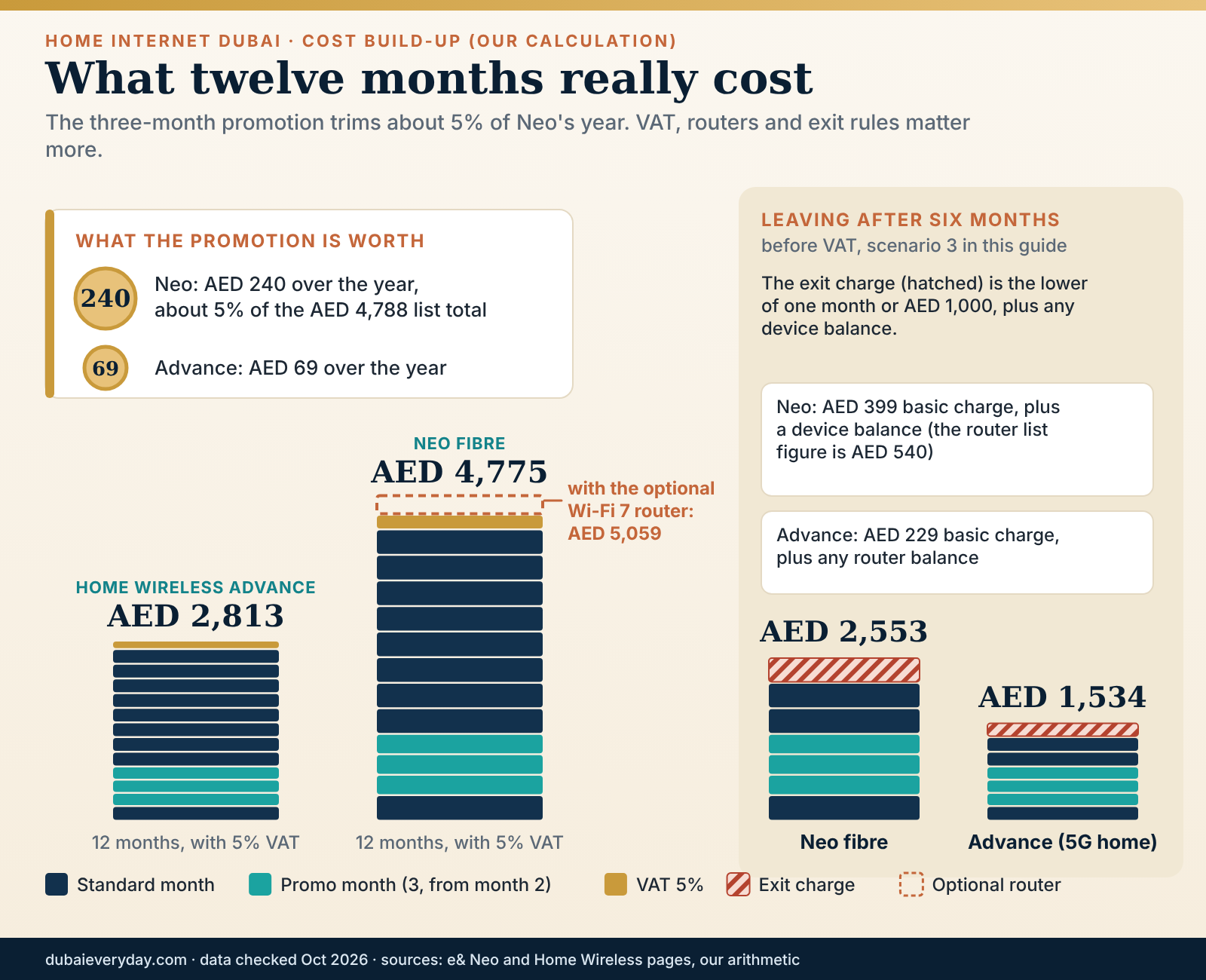
What the promotion is really worth
“20% off” sounds large on a home internet Dubai plan. On a twelve-month Neo contract it saves AED 240 before VAT, about 5% of the year’s list total. A promotion that lasts three months cannot change the cost of a twelve-month contract by much, and it can disappear next week. Use the standard price to compare home internet Dubai plans, and treat the promotion as a small bonus that may or may not still exist when you order.
The bigger levers in a home internet Dubai bill are the term, the router add-ons and the exit rules. Choosing the Wi-Fi 7 router adds more over the year (AED 270) than the promotion subtracts (AED 240). That is not a reason to refuse it. It is a reason to know the trade you are making.
Exit charge examples
Suppose you leave Neo after six months with the standard router. On the published rule, the basic charge is the lower of one monthly charge (AED 399) and AED 1,000, so AED 399 before VAT. Add the device component, which the page does not quantify for the standard router. If you took the Wi-Fi 7 router and the component is the unpaid balance, 18 remaining instalments of AED 22.5 add AED 405.
That gives AED 804 before VAT. If the component is instead the full AED 540 listed for the router, the total reaches AED 939. So the realistic range runs from AED 399 to AED 939, and only the contract can narrow it.
On Home Wireless Advance, leaving after three months costs the lower of AED 1,000 or AED 229, plus any router balance. Compare that with the AED 2,061 you would pay for the remaining nine months. In our reading, the cap makes wireless the cheaper way to test a flat or a tenancy you are unsure about, as long as you accept the location lock.
Questions that belong in every home internet Dubai contract
- What is the monthly charge after the promotion, excluding and including VAT?
- Can the monthly charge change during the minimum term, and with what notice?
- What happens at the end of the term: does it roll over, at what price, and can I leave without a charge?
- What are the device instalments, how many months, and what do I owe if I leave in month 4, 9 or 15?
- Whose name and Emirates ID is the account in, and how do I transfer it?
We could not find on the pages we read what happens to a home internet Dubai plan when the term ends, whether the price can change during the term, or how late payments are treated. Those are exactly the clauses to ask about, and the answers should come in writing. If an agent offers a verbal assurance, ask them to put it on the order form or send it by message.
Whose name is on the account?
A home internet Dubai line usually sits under one person’s identity, and that person carries the contract, the bills and the exit charge. In a shared flat, this is a practical decision before it is a financial one. If the account holder moves out, a clean transfer to a housemate is easier than a termination. Agree in writing who pays, how the bill is split, and what happens when someone leaves; a short message thread is enough if everyone confirms.
The same logic applies to couples and families with a home internet Dubai account when one partner’s residency or job situation could change. The monthly cost matters less than the question of who is legally responsible for the line. Our cost of living guide and the single-person monthly budget show where an internet bill sits among rent, transport and food, which can help you decide how much to spend on speed.
Discounts and eligibility
The Neo page lists a 50% discount on the monthly recurring charge for People of Determination with a valid Ministry ID. If it applies to you or someone in your household, ask for it at the point of ordering and check whether it combines with the online promotion. We could not verify how the two interact, so ask for a worked monthly figure with both applied.
Ordering: documents, timing and who signs
Ordering home internet Dubai service takes minutes. Arriving at the order with the right paperwork, in the right sequence, is what takes planning. Neither operator page we read lists the documents for a home line, so what follows is partly the published rule for SIMs, partly the logic of how Dubai paperwork chains together, and partly a short list of items to confirm by phone. Do not treat our document list as the operator’s.
The identity question
For mobile SIMs, TDRA’s FAQ says residents register with an original Emirates ID (copies are not accepted), while visitors use a passport for a limited period. Home internet Dubai lines are a different product and may ask for different documents, but the Emirates ID is the anchor of resident services in the UAE, so expect to need it or to need a valid reason for not having one yet. The companion internet and mobile guide explains the Emirates ID and UAE PASS chain in detail.
If you have just arrived, the home internet Dubai sequence is visa, medical and biometric steps, then the Emirates ID card, which takes days to arrive. Our residence visa guide and the work visa guide cover those steps. The practical consequence is that the first week often has a home but no card, and therefore no fixed contract yet.
Check what is already in your name
Before you order home internet Dubai service, check whether any line is already registered under your Emirates ID. TDRA’s Hesabati service lets Emirates ID holders see the fixed and mobile numbers registered under their ID, free of charge, after logging in with UAE PASS on the TDRA website. Inactive numbers do not appear. It is a one-minute check that catches forgotten lines, and it matters more if you have lived in Dubai before or someone else has used your details.
Tenancy paperwork comes first
A home internet Dubai order is tied to an address, so the address needs to exist on paper. For tenants, that normally means a signed tenancy contract and an Ejari registration; for owners, a title deed or sales document. Many tenants also activate DEWA before the internet order, because the electricity and water account gives the premises a verifiable utility record. Our DEWA move-in guide explains the order and the deposit.
We could not confirm which of these documents a given operator asks for, or whether it accepts them in digital form. The safe approach is to carry the tenancy contract, the Ejari certificate, the Emirates ID and your phone with UAE PASS ready, then ask on the phone before you travel to a store which of them they need. If the answer is “bring the original”, bring the original.
Ordering channels
The Home Wireless page says to order home internet Dubai service through the e& website or the e& UAE app, with free delivery of the SIM or router aimed at 24 hours. The Neo page links to a store locator for fibre, and the support number for e& is 101 (or 800101). Fibre involves an address check and an appointment, so a phone call or store visit often gets a person who can see your building. An online order is quicker for wireless, because there is no visit.
Whichever channel you use for a home internet Dubai order, save the order confirmation, the quote, the plan name and the date. If the plan price on the page changes between your first visit and the order, a screenshot taken at the time is useful evidence of what was offered.
When to order
Order home internet Dubai fibre as soon as three things are true: you have the signed tenancy, you know the move-in date, and you have confirmed building-level availability. Ask for the appointment date at the time of ordering. We found no published lead time for fibre installation, so as a planning rule, do not promise yourself a working line in the first days. Plan a bridge, and treat any quicker start as a bonus.
For a first-time arrival, the order of work for home internet Dubai usually looks like this: land with a visitor line or eSIM, sign the tenancy, register Ejari, connect DEWA, order the home line, receive the Emirates ID, and then convert any temporary arrangements to resident contracts. The relocation checklist and the moving to Dubai guide place the internet order inside that wider timeline.
A sensible first-week bridge. If the flat has no active line when you arrive, use a phone hotspot or a visitor plan for the first days, and order the home line the day the tenancy is signed. If the wireless route fits your address, 5G home can bring a connection in about a day, because the page describes delivery aimed at 24 hours and no installation visit. Put the cooling-off dates in your calendar.
Owners, landlords and rent that includes internet
Owners order home internet Dubai service for their own unit and usually do not need anyone’s permission, though building rules on cabling still apply. Landlords who let a furnished or serviced unit sometimes include internet in the rent or the service charge. Check the tenancy contract for a line about utilities or internet, and ask whether the existing account is in the landlord’s name. If it is, you want a written statement of who pays, who holds the contract and what happens at the end of the tenancy.
If you are renting out a flat and wondering whether to leave a home internet Dubai line active, the answer depends on your tenant, your contract and your costs. The legal side of landlord and tenant duties is a tenancy matter, so use the renting in Dubai guide and the tenant rights guide for the contract and dispute rules, and keep the telecom questions on this page.
Employers, receipts and VAT
If your employer reimburses home internet Dubai costs, ask what the finance team needs. Plans are quoted excluding 5% VAT, so a tax invoice that shows the supplier, the amount and the VAT can matter for expense claims. We could not verify how operators issue invoices for home lines, so check the app or the first bill and ask for a copy if it is not shown. Never assume your employer will accept a screenshot of a price page as a receipt.
For self-employed residents, the same invoice may serve as a business expense record. Our guides to bookkeeping in Dubai and accounting services cover record-keeping in general. For the tax treatment of a home-office cost, speak to an accountant, because we do not give tax advice.
Installation day, step by step
The operators’ public pages say little about what a home internet Dubai fibre installation involves, so this section combines what they do say with how a fibre connection is built. The steps are a reasoned sequence, not a published procedure, and your technician may do them in a different order. Home Wireless is the exception: its page says activation is automated with no complex installation, so for wireless, skip to the self-install notes at the end.
From order to appointment
After a home internet Dubai order, the operator checks the address and books a visit. Ask three questions at that point: the date and time window, whether someone must be at home, and whether building management needs notice. If the building requires an access permit or limits technicians to certain hours, a missed permit is the most common reason for a visit that goes nowhere. We cannot quantify how often that happens, but it is a plausible failure and an easy one to prevent.
On installation day for home internet Dubai fibre, confirm the technician’s name and the visit reference when they call. Make sure the entry room or riser access is arranged and that someone can show them the way. Clear the route to the planned socket and the router spot, and decide where you want the router before they arrive; a technician will usually place it where the socket is unless you say otherwise.

What happens on the day
The technician usually works from the outside in. Fibre is checked at the building’s entry or telecom room, carried up the riser to your floor, and brought into the flat to a socket or a small converter box. A router is connected to that box and configured. The line is then activated and tested. Each stage depends on the one before, which is why a missing permit or a blocked riser stops everything.
Run through the home internet Dubai checklist below while the technician is still there. Leaving the first time costs nothing; calling them back costs days.
- The router is on, its status lights are steady, and the technician has told you what the lights mean.
- A computer connected by Ethernet reaches the internet, and you have run at least one speed test.
- Wi-Fi works in the main rooms. Walk through the flat with a phone and check the far rooms.
- You have the account number, the visit reference and the technician’s contact route.
- You know who owns the router and what to do if the plan is cancelled.
- You have photographed the socket, the box and the router label.
Where the router goes
The socket decides the first position, but you can often choose a better one if a cable can run there. The best spot is central, open, and off the floor. The worst are inside cabinets, behind televisions, next to metal doors or beside the kitchen. We cover the physics in the Wi-Fi section; for installation day, the point is that moving a router later is easy only if the cable can reach.
If the socket is in a bedroom or a corner and the living area is the priority, ask the technician whether they can extend the connection, or whether a long Ethernet cable to a better position is acceptable. Do not move the fibre cable yourself. Fibre does not like sharp bends, and the connector is delicate. Moving the router on the network side of the converter box is safe; moving the fibre side is not.
Cables, drilling and the tenancy
Running a cable across a skirting board or through a wall is a physical change to someone else’s property, if you rent. Ask the landlord before any drilling, and prefer surface trunking or adhesive clips that can be removed at the end of the tenancy. Photograph the original condition. If a technician proposes drilling a hole in a wall, you are entitled to ask whether an alternative exists, and to check with the landlord first. Our renting guide explains why the condition of the unit at hand-over matters when the deposit is returned.
The shared parts of a building are not yours to touch. The riser, the entry room and corridor ceilings belong to the building, and building management decides who enters. If a technician says they cannot finish because they cannot access the riser, ask for the reason in writing, and ask management when access can be arranged.
When the visit fails
Sometimes a home internet Dubai technician cannot complete the job. The common reasons in principle are no access to the riser, no free fibre capacity, a missing socket, or an address mismatch. Ask for the cause in writing or by message, and ask what the operator will do next and by when. If the problem is availability rather than access, ask whether wireless is possible at your address, and whether the order can be changed to that plan without penalty.
Keep dates for every home internet Dubai visit. A log with “visit on 12th, failed, access refused, rescheduled to 19th” is exactly the sort of record you need if you later ask for a refund of a first bill, or dispute a charge for a line that never worked. We return to evidence in the problems section.
First-hour router settings
On a new home internet Dubai router, change the default Wi-Fi password if the router ships with one printed on a label, and choose a name for the network that does not reveal your flat number. Keep the administrator password somewhere safe. If the router offers a guest network, set it up for visitors, because it keeps their devices away from your laptop and smart-home devices.
If the router offers automatic updates, leave them on. If you plan to use parental controls, set them up now, because the same router settings page will be easy to find. On e&’s Wi-Fi 7 option, the router is remotely managed by the operator, according to the Neo page, which simplifies updates and limits how much you can change yourself. Ask what is configurable before you pay for it.
Self-install for wireless
With Home Wireless, the page describes the setup: insert the SIM into the router, power it on and connect devices using the password on the router. The service falls back to 4G where 5G is unavailable. The router placement matters more than for fibre, because signal strength depends on the cellular signal reaching the router. Try a window first, then try another room, and watch for the difference over a few hours.
Run the speed log at the position you choose, at the busy hour as well as in the morning. If speeds are poor everywhere in the flat, use the cooling-off window to cancel without an exit charge, and move on to fibre or another option.
Closing the visit
Before the technician leaves, ask for the visit to be marked complete only after you have confirmed the speed test. Keep the paperwork from the visit. Within the first week, run the busy-hour test, check the first bill against the quote, and look for charges you did not expect: an installation fee, a router fee, a pro-rata line, a bundle you did not order.
Wi-Fi at home: routers, mesh and dead corners
When a household says “the internet is slow”, the home internet Dubai plan is rarely the culprit. The fibre line may be delivering what it promised at the router, while the signal that reaches the study at the far end of the flat is a fraction of that. Most of what you can control in a home internet Dubai setup is on the Wi-Fi side, and most of it is free.
Why signal fades
Wi-Fi is radio, and radio weakens with distance and with whatever it passes through. Reinforced concrete, metal doors, mirrored wardrobes, water pipes and kitchens all absorb or reflect signal. Many Dubai buildings use concrete construction, so a router at the entrance door may reach the living room well and the master bedroom poorly. The effect is not mysterious; it is the reason a phone shows full bars in one room and a spinning wheel in another.
Wi-Fi also comes in bands. The 2.4 GHz band travels further through walls and runs slower. The 5 GHz band is faster over shorter distances. Newer routers add a 6 GHz band, which is faster again and reaches less far. Modern routers combine these bands under one network name and steer devices automatically, which is convenient and sometimes wrong. If one device clings to a weak band, forgetting and rejoining the network can help.

Where to put the router
Aim for the middle of the space you use, high enough to clear furniture, with nothing metal or watery next to it. A shelf in the living room is better than a cupboard, a floor-level cabinet or the back of a television. Keep it away from microwave ovens and cordless phone bases, and do not hide it behind a thick curtain.
If the socket is by the front door, you have three options. Ask the technician for an extension to a central position, run a cable along a wall from the converter box to a better spot, or add a second access point connected by cable. The infographic above shows why the first two usually beat leaving the router where the socket is.
Mesh, extenders and access points
When one router cannot cover the flat, there are three common fixes. A mesh system uses several units that create one network and hand your devices between them. A range extender repeats the signal from the main router and usually halves the speed it carries. A wired access point connects to the router by an Ethernet cable and broadcasts its own signal, which is the most reliable of the three but needs a cable run.
Our order of preference is wired, then mesh with a wired link between units if possible, then mesh over radio, then extenders. We cannot recommend a brand, because we have not tested any and our selection would not be field-based. Check the operator’s own guidance first. The Neo page says third-party routers may not get remote troubleshooting and that a technician visit may incur charges, so prove the line is healthy with the operator’s router before adding equipment of your own.
A simple room-by-room test
Before you buy anything for your home internet Dubai setup, map your problem. Stand in each main room with a phone, run a speed test, and write down the result. Do it at the busy hour. If the weakest rooms are also the farthest rooms, the fix is distance and walls, and a mesh node or a repositioned router will help. If every room is slow, including the one next to the router, the problem is the line or the plan, and a mesh system will not fix it.
Then test one room twice, first on Wi-Fi and then with a laptop on an Ethernet cable plugged into the router. If the cable result is near the plan’s typical speed and Wi-Fi is far below it, the line is fine and the radio side needs work. If both are poor, report a fault with your log.
Villas and multi-floor homes
A single router in a two-storey villa will struggle on the far floor. Put the router near the centre of the house, ideally on the stairs landing or a ground-floor hall, and add a wired access point upstairs if you can run a cable. Garden coverage is a different problem: outdoor access points exist, but they need power and a cable. Ask the landlord about conduits before the first technician visit if you rent. Our villa rental guide explains the inspection and maintenance questions that sit alongside this.
Heat, power and tidy habits
Routers and converter boxes run warm, and a closed cupboard in a hot flat can make them hotter. Give the equipment space to breathe and keep it out of direct sun. Plug it into a surge-protected strip, and if power cuts or short interruptions would hurt your work, a small battery backup for the router and the converter box keeps a call alive. Both devices need power, so protect both.
Finally, keep a note of the router’s model, its serial number and the default administrator login in a safe place. When you cancel or move, you will need to return the operator’s equipment, and a photo of it on the day you hand it back is a cheap form of protection.
Smart-home devices and the 2.4 GHz crowd
Plugs, bulbs, cameras and many air-conditioning controllers connect on the 2.4 GHz band because their radios are simple. They are light users of data and heavy users of patience: they drop off when the router changes settings, and some refuse to join a network that merges bands under one name. If a smart device will not connect, temporarily using a router setting that exposes a 2.4 GHz-only network usually solves it.
The Neo page says its premium router supports up to 25 connected devices. A modern flat can approach that number faster than expected once phones, laptops, televisions, speakers, plugs and cameras are counted. Count your own devices honestly. If you are near the limit, ask the operator about it before you rely on a single router.
Moving flat, renewing and leaving Dubai
Dubai is a city of annual tenancies, which means a twelve-month home internet Dubai contract and a twelve-month lease can collide. Many households move within the city, switch buildings at renewal or leave the country with a contract still running. A home internet Dubai line that suited the old flat can become a liability in the new one, so it is worth planning the end of the contract on the day you start it.
Moving within Dubai
The two e& home internet Dubai products handle a move differently. Fibre is tied to the building, so a move normally means ending service at one address and starting it at another. The Neo page links to a “Home move” page but states no fee or process, so ask what a transfer costs, how long it takes and whether your minimum term restarts. Home Wireless is tied to your home location but can be relocated: one free move per calendar month by calling 101, then AED 100 (excluding VAT) for each extra move in the same month.
The wireless rule makes it forgiving for people who move often, and the fibre rule makes it worth confirming availability at the new address before you sign the new lease. If the new building has no fibre from your current operator, the move can force a termination, and the exit charge is the cost of that surprise.
A timeline for the move
- Before signing the new leaseCheck the new building’s availability with the operator and building management, and ask the landlord about the socket and existing line.
- Four to six weeks beforeAsk your operator what a transfer costs and how long it takes. Compare with a fresh order from the operator that serves the new building.
- Two weeks beforeBook the new installation for the move-in date or just after. Arrange a wireless bridge if the date is uncertain.
- Move weekKeep the old line until you have left the flat and handed over the keys. Photograph the equipment before you pack it or return it.
- After the moveCancel or transfer the old service, return the equipment, and keep the cancellation reference. Check the final bill against the termination date.
The utilities that surround this timeline are covered in the DEWA move-out guide, which explains the final bill, deposit refund and disconnection. Internet is a different account, but the habits are the same: close accounts on a date you have recorded, and keep the proof.
Keeping your landline number
If your home package includes a landline, you may want to keep its number when you switch operators. TDRA says geographic fixed numbers (prefixes 02, 03, 04, 06, 07 and 09) can be ported at no extra charge, that it takes about three working days for individuals, and that porting back is possible within seven working days. Most households no longer care about a landline, but a small business operating from home might, and the rule is useful to know before you cancel.
Renewal and the month after the term ends
We could not find what e& does when a Neo or Home Wireless term ends: whether service continues month to month, whether the price changes, or whether it renews for another year. That is a question for the contract. Put the end date in your calendar and ask a month before it arrives. At that point you can compare quotes, ask whether a retention offer exists and decide whether to switch, knowing the exit charge is no longer attached.
Be sceptical of the notion that staying silent on a home internet Dubai plan is free. If a promotional price expires and the standard price takes over, the bill rises without any action from you. The difference between the Advance promotion (AED 206) and its standard price (AED 229) is small, but the difference between the Neo promotion (AED 319) and its list price (AED 399) is AED 80 a month, which is AED 960 over a year.
Upgrading and downgrading mid-term
The Neo terms treat a downgrade as an early exit. Cancelling or downgrading before the minimum term ends costs the lower of one monthly charge or AED 1,000; downgrading to another plan with an exit charge is charged as the lower of the monthly difference or AED 1,000 minus the new monthly charge. The page does not say what an upgrade costs. If you suspect you will want a faster or slower plan inside a year, ask whether a change is free before you accept a discount in exchange for a long term.
Leaving Dubai with a contract running
Leaving the country does not end a home internet Dubai contract by itself. Ask for the termination before you go, pay the exit charge if one applies, return the equipment and get the cancellation confirmed by message or email. An unpaid final bill can follow you. Our internet and mobile guide covers the mobile side of leaving, including the lapse rules for SIMs tied to an expired Emirates ID.
If you are leaving within a few months of arriving, the cheapest route is probably 5G home on a short term, because its exit charge is capped at the lower of AED 1,000 or one month. That is our reading of the published terms, not a guarantee, so run the arithmetic with the actual quote in front of you.
Selling or buying a home
Owners selling a flat should close the account in their own name and tell the buyer that the line, router and socket are no longer theirs. Buyers should assume nothing about an existing line. Our guides to buying property in Dubai and buying as a foreigner cover the purchase process; the internet item on the handover day is a short list: socket location, equipment ownership, account closure, and a bridge until the new line is live.
Working from home, families and safety
A home internet Dubai line has jobs beyond streaming. It carries work calls, school platforms, smart-home cameras and the phones of everyone who lives there. The needs differ by household, so this section starts with remote work, moves to families, and ends with the security habits that apply to all of them.
Home internet Dubai for remote work
Remote work on home internet Dubai needs consistency more than raw speed. A video call needs a few megabits in each direction, but it needs them without drops, and its quality depends on upload speed and latency as much as on download. Use a cable from the router to the desk if you can, keep work devices on a wired port, and let the household use Wi-Fi. That one change removes most call-quality complaints.
Build a fallback you have tested. A phone hotspot can carry a call, and a 5G home router can carry a day of work. Neither is a replacement for fibre, but both are enough to finish a meeting when the main line fails. Test the fallback with your actual work tools, because some corporate software behaves differently on a different network. Add a small battery backup for the router and converter box if short power interruptions would cost you a client.
Calls, messaging and the VoIP rule
TDRA’s FAQ says VoIP services not provided by a licensee or approved by TDRA are generally not permitted, and that licensees must block unlicensed VoIP. TDRA publishes a list of approved VoIP applications. In practice, some consumer calling apps may not place calls on a home connection while messaging works. Because the rules and the apps change, check the approved list rather than trusting a forum thread.
Employer systems, such as licensed business telephony or corporate video tools, are a separate matter, and your IT department will know what works from home. If a work tool does not connect, ask IT before you assume the line is faulty. Our internet and mobile guide sets out the calling and VPN rules in more detail, so we do not repeat them here.
Families and children online
The government’s child digital safety page describes Federal Decree-Law 26 of 2025, which sets duties for platforms and for internet service providers. Among other things, it says providers must filter harmful content and provide parental-control tools, that under-15s may not create or operate personal social media accounts, and that data of under-13s needs parental consent. The page also points to the Sannif platform for games.
What that means for a home internet Dubai parent is simple. Ask your operator which parental-control tools it provides at the router or account level, set them up on installation day, and add device-level controls on phones, tablets and consoles. The law sets duties for platforms and providers, and it does not replace supervision. If your child’s school uses online platforms, check the school’s own requirements; our Dubai schools guide covers the wider school decisions.
Older relatives and visitors
Visiting parents and grandparents rarely care about speed and care a lot about simplicity. Give them the guest network password on a card, make sure the router is somewhere they can find, and write the network name next to the television. If they use video calls to family abroad, check that the apps they use work on your connection, because of the calling rules above. A weak Wi-Fi spot in the guest room is a more common complaint than a slow plan.
For houseguests on short stays, a guest network keeps their devices separate from yours and can be turned off when they leave. If you host often, it is worth a minute to learn how to create and disable one on your router.
Cameras, pets and privacy
Home cameras are popular, and they raise privacy questions that a router setting cannot answer. A camera should watch your own space and not a neighbour’s door, a shared corridor or a person who has not agreed. Filming other people without consent can breach UAE privacy and cybercrime rules, so check the official guidance and our legal basics guide before you point a lens anywhere beyond your own flat.
Many owners use a camera to check on a pet in a hot flat. The camera is the easy part; the heat, housing and registration questions are covered in the pet ownership guide. Whatever you install, change the default passwords, keep the device software updated and use a strong, unique password for its account.
Router and account security
Four habits cover most of the risk on a home internet Dubai network. Change default passwords on the router and any connected device. Keep firmware updates on automatic where the operator offers them. Use the guest network for visitors and for smart-home gear you do not fully trust. And treat the account itself as sensitive, because anyone who controls it can change the plan.
The wider risk is social, not technical. Scammers send texts that claim your internet will be disconnected, or that a bill is overdue, with a link. TDRA’s guidance on spam texts says marketing messages need consent, may only be sent between 7 am and 9 pm UAE time, and must include a free way to unsubscribe. A message that threatens disconnection and urges you to tap a link fits none of that. Open the operator’s own app instead and check the account there.
Where to report a scam
Per the government portal’s guidance on economic crimes, you can report cyber-enabled financial scams to the Dubai Police eCrime platform and to the local police, and call 999 in an emergency. If you tapped a link or shared a code, contact your bank at once, change the passwords for the affected accounts and tell the operator. Our internet and mobile guide has a first-hour plan for exactly this situation.
Home internet Dubai and the household budget
A home internet Dubai bill is a small line next to rent, but it is also one of the few fixed costs you can reduce without changing your lifestyle.
The Neo plan averages roughly AED 398 a month including VAT over the first year on our calculation; Home Wireless Advance averages roughly AED 234. If you are building a budget, the cost of living guide shows where this sits against rent, schooling and transport, and it helps to treat the difference between two plans as a number to compare with other discretionary costs, not as a quirk.
When the line misbehaves: faults, evidence and complaints
Most home internet Dubai faults are small and fixable in a call. Some are not, and for those the quality of your evidence decides how quickly a problem is taken seriously. This section gives you a way to find which link in the chain is failing, the order in which to escalate, and what the regulator will and will not do.
Find the failing link
Start at your device and work outward along the home internet Dubai chain. If one device is slow and others are fine, the problem is that device or its Wi-Fi. If every device is slow on Wi-Fi but a laptop on a cable is fine, it is the radio side. If the cable is also slow, restart the router and the converter box, then test again. If the router shows a warning light or no connection, the fault is upstream of your flat.
Check the operator’s app or website for a service notice, and ask a neighbour if their line is also down. If it is, you are likely dealing with a building or street fault, and there is nothing on your side to repair. If only you are affected, the technician needs to look at your socket, your cable or your account.
- One device or all?Test a second device. If only one struggles, fix that device first.
- Cable or Wi-Fi?Plug a laptop into the router. A healthy cable result narrows the problem to Wi-Fi.
- Restart in orderPower off the router and the converter box, wait a minute, power on the box first and then the router.
- Check for noticesLook at the operator’s app for outages and ask a neighbour on the same operator.
- Call with evidenceReport the fault with your speed log, the times it occurs and what you have already tried.
The evidence pack
An evidence pack for a home internet Dubai fault is a short file you build as you go. It holds the quote or plan page you ordered from, the order confirmation, the installation visit reference, a dated speed log, screenshots of results, photographs of the router lights during a fault, and a list of calls with the date, time, agent name if given, and reference number. Nothing here requires technical skill, only discipline.
The pack changes the conversation. “It has been slow for a week” gets a standard reply. “Between 8 and 10 pm on five days out of seven, the cable test delivered 40 to 70 Mbps against a typical 900 for this plan, and I have the screenshots” gets a technician. Keep the numbers honest and the claims modest.
Escalating inside the operator
Start with the operator’s support line for your home internet Dubai fault. For e&, the Home Wireless page gives 101 and 800101. Ask for a reference number on every contact. If the first call fixes nothing, ask for a technician visit and a date. If the visit fails, ask for a supervisor or for the complaint to be logged formally, with a reference you can quote.
Give the operator a reasonable period to fix the fault, and then escalate in writing. A message or email that sets out the timeline, the attempts made and the outcome you want is easy to forward and easy to attach to a complaint later. Ask what you are entitled to if the service is unusable: a credit, a fee waiver or an exit without charge. We could not find a published service-level credit for home lines on the pages we read, so the answer may be “case by case”, and you should ask in writing.
The TDRA dispute route
If the operator does not resolve the issue, TDRA runs a dispute resolution service for complaints against telecom providers. Its page says you must complain to the provider first. If you are not satisfied, you can submit the complaint to TDRA, log in with UAE PASS, fill in the form and track it online. The expected response times are five working days for regular cases, ten for medium and fifteen for complex ones. The service is free and handles telecom providers only. Channels include the TDRA Smart App, its website and the call centre on 800 12.
The provider’s reference number is the ticket into that process, which is why we ask you to collect one on every call. TDRA can only work with what you give it, so attach the evidence pack: the contract or quote, the log, and the sequence of contacts. For disputes that are not about telecom, such as a landlord who will not allow a line, the regulator is not the right door; see the tenant rights guide and the legal basics guide for how to find the right authority.
Billing disputes
Check the first home internet Dubai bill carefully. Common surprises are a pro-rata first period, the promotion starting from the second month rather than the first, a router fee you did not expect, and VAT you did not budget for. All of these can be legitimate under the terms, which is why you should compare the bill against your saved quote line by line.
If a charge is wrong, contact the operator, quote the plan page you ordered from and ask for a correction in writing. If you dispute a payment, keep paying the undisputed part and record what you disputed. If the matter is unresolved, the TDRA route above applies.
When to ask for a technician, and when not to
Ask for a technician when the cable test is poor, when the converter box shows an alarm that persists after a restart, or when the fault returns after a restart. Do not ask for a visit for a Wi-Fi problem in a room two walls from the router, because the technician will find a healthy line and you will have used an appointment. If you use your own router, expect to be asked to swap in the operator’s before diagnosis, and note that the Neo page says a technician visit for third-party equipment may incur charges.
Outages, weather and heat
Short outages happen, and a well-run network should recover quickly. Two things are worth recording: how long the outage lasted, and whether it recurs at the same time of day. A fault that follows the air-conditioning load on a hot afternoon points to a power or heat issue in your equipment. A fault that follows the evening peak points to congestion or a Wi-Fi band problem. Your log will show the pattern even when the cause is not obvious.
Summer note. Routers in closed cupboards can overheat in a warm flat, and power interruptions are harder on equipment than on people. Give the equipment space, keep it out of direct sun, and plug it into surge protection. If a router restarts itself at the hottest hour, move it before you blame the operator.
Six households, worked through
The home internet Dubai scenarios below are illustrative examples, not quotes, market facts or real people. They apply the e& terms published on 29 October 2026 to common Dubai situations so you can see how the arithmetic and the decisions interact. Replace the numbers with your own quote. Prices exclude VAT unless we say otherwise, and each calculation assumes the promotion applies for three bills.
1. The new arrival without an Emirates ID yet
Illustrative example: a single professional arrives, signs a one-bedroom tenancy and waits for the Emirates ID to arrive. The home internet Dubai order is the problem: a fixed contract is easier with the card in hand, and the first weeks need connectivity anyway. A phone hotspot covers the first days. When the card arrives, the choice becomes fibre or wireless.
On the published terms, Neo costs about AED 4,775 over twelve months with VAT, and Home Wireless Advance about AED 2,813. The gap is roughly AED 1,962 in year one. If the flat has fibre enabled and the person works from home, the fibre premium buys stability. If usage is light and the person is not sure about staying twelve months, wireless saves nearly AED 2,000 and carries a lower exit charge. Check coverage at the address first.
2. A family of five in a two-storey villa
Illustrative example: five people, a villa, several streaming screens and school work in the evenings. Speed is not the issue; coverage across two floors is. The sensible package is fibre with the operator’s router in a central position and a wired access point upstairs, or a mesh system with a cable between the nodes.
On our arithmetic, home internet Dubai fibre (Neo with the Wi-Fi 7 router) is about AED 5,059 with VAT in year one, about AED 422 a month. The family should ask for parental-control tools on day one, confirm that the router supports the number of devices in the house, and check the landlord’s view on cabling before the first visit. The villa rental guide covers the inspection side of the tenancy.
3. The six-month tenancy
Illustrative example: a couple takes a flat for six months while their home is renovated. A twelve-month fibre contract is a poor fit. Wireless on a 12-month term, left after six months, costs three months at AED 206, three at AED 229 and an exit charge of AED 229, a total of AED 1,534 before VAT. Fibre, left after six months, costs six bills at AED 399 less AED 240 of promotion, plus an exit charge of AED 399, which is AED 2,553 before VAT, plus any device component.
The difference is about AED 1,019 before VAT in favour of wireless. That holds only if wireless coverage is good at the address, so use the cooling-off window as a test. The couple should also ask the landlord whether the flat has a line that could simply be taken over for the stay.
4. The remote worker who cannot afford to go offline
Illustrative example: a contractor whose income depends on video calls. The worker takes Neo fibre as the main line, wires the desk, and keeps a second path. A full second contract is expensive: Advance for twelve months adds AED 2,679 before VAT on top of Neo’s AED 4,548. A cheaper route is to keep Advance for the busiest three months only, which costs AED 618 plus an exit charge of AED 229, so AED 847 before VAT.
Even cheaper, if the mobile plan allows hotspot use at a usable allowance, is the phone. The worker should test whichever backup they choose with the actual work tools, and add a battery backup for the router and converter box. The last piece is a written note of the steps to switch over, so the fallback works under pressure.
5. The mid-contract mover
Illustrative example: seven months into a Neo contract, a tenant must move to a building where fibre is not available from the same operator. Staying on the contract would mean paying five more months, about AED 1,995 at the list price. Exiting costs the lower of one monthly charge or AED 1,000, so AED 399, plus the device component.
On those numbers, exiting saves about AED 1,596 before device charges, but the tenant still needs a line at the new address. If wireless works there, Advance for the remaining months costs roughly AED 1,100 before VAT, and the combined total is still below the cost of paying out the old contract. The tenant should ask the operator whether a transfer to a covered address exists, and compare that with the exit path in writing.
6. The light user who wants it simple
Illustrative example: a retired couple using email, news and video calls to relatives. They need dependable Wi-Fi in two rooms and nothing more. A gigabit plan is more than they need, and a TV bundle may add commitments they do not want.
The best home internet Dubai route is the lowest-cost plan that reaches their address, without a TV box, with a router in the living room. If only the fibre plan is offered, they should ask whether a slower tier exists. If wireless works well in the flat, Advance at about AED 234 a month with VAT in year one is a reasonable fit, and the cooling-off window protects them if the signal is poor. A relative can help them set the guest network and the parental controls so that nothing needs to be touched again.
What the six cases have in common
None of these home internet Dubai decisions turned on the brand. In each case, availability narrowed the options, the contract term and exit rule set the downside, and the router position decided whether the plan felt fast. That is the pattern to carry into your own quote: check the address, read the term, compute the twelve-month total, and then test the line.
A final observation from the numbers. The monthly difference between a mid plan and a top plan is often smaller than the cost of getting the decision wrong once. Leaving a twelve-month term early can cost AED 1,000 at most on the published e& plans, which is about two and a half months of Neo. A cautious first contract is cheap insurance against a flat that does not suit you, and a longer one is a good deal only once you know it does.
Mistakes that cost the most
Most expensive errors in home internet Dubai orders are not exotic. They are ordinary shortcuts taken at the moment of signing, when the sales channel is friendly, the move date is close and nobody wants another phone call. Here are the ones the published terms make most costly, in rough order of damage.
Choosing the plan before checking the address
A home internet Dubai plan page is not an availability check. Ordering a plan and discovering at the visit that your unit cannot be enabled wastes days and, depending on the contract, may start a clock. Get a building-level answer first, in writing, and climb the ladder as far as time allows.
Letting a three-month promotion decide a twelve-month contract
On Neo the promotion is worth AED 240 over the year. On Home Wireless Advance it is worth AED 69. Compare plans on the standard price, the term and the exit rules, and treat the promotion as a small extra that may be gone by the time you order.
Ignoring device instalments
A Wi-Fi 7 router, a 4K box and a home phone each carry their own 24-month instalments, and each adds to the exit bill. If you do not need them, decline them. If you want them, know that leaving in month 8 means paying what is left.
Putting the router where the socket happens to be
The wall socket is placed for the builder’s convenience. The router belongs where you live. Ask for an extension on installation day, or run a cable afterwards. This is the cheapest improvement in the guide.
Ordering before the paperwork exists
A fixed home internet Dubai contract needs an address and an identity. Ordering in a rush and then waiting for the Emirates ID or the Ejari to catch up delays the install and can leave you paying for a line you cannot use. Bridge with a hotspot and order when the paperwork is ready.
Trusting a spoken promise
“The installation is free” and “there is no exit charge” are the kind of sentences that vanish after the call. Ask for them in a message or on the order form. If the operator will not write it down, assume it is not true.
Testing once, on Wi-Fi, in the best room
A single speed test at the router at 10 am proves nothing about the evening in the study. Use the log: cable first, Wi-Fi in the far room, busy hour, several days. That is what a technician or TDRA can act on.
Missing the cooling-off window
Home Wireless gives three, seven or 14 days of penalty-free cancellation depending on plan and router choice. People forget the date and then pay the exit charge for a signal they never liked. Put the last day in your calendar when you activate.
Letting the line outlive the tenancy
A home internet Dubai contract does not end because you moved. Cancel or transfer on a recorded date, return the equipment, keep the confirmation and check the final bill. Add it to the move-out list next to the DEWA final bill.
Tapping a bill-scare link
A text that says your internet will be cut off unless you pay in the next hour is a pressure tactic. Open the operator’s app, check the account there and never share a one-time code. If you already tapped, follow the first-hour steps in the companion mobile guide.
A ten-minute action list
- Write down your building name, unit number and move-in date.
- Ask each operator for building-level fibre availability and a reference.
- Ask building management about technician access and permits.
- Request a written quote with the monthly charge, VAT, promotion length, term, exit formula and device instalments.
- Compute the twelve-month total including VAT for each quote.
- Check Hesabati for any existing line in your name.
- Book the install for a date after the tenancy and DEWA are in place, and arrange a bridge.
- On the day, test by cable and Wi-Fi, photograph the equipment and save the references.
- Put the cooling-off date, the term end date and a move-out reminder in your calendar.
Home internet Dubai FAQ
Which is better for home internet Dubai residents, du or e&?
For home internet Dubai, neither is better in general. The better operator is the one whose fibre is live in your building and unit, on terms you have read. Both hold licences until 2046 and both publish coverage maps. We verified e& plan terms but could not read du’s home pages, so we cannot rank prices. Ask both for a written quote with the monthly charge, VAT, term, exit formula and device charges, then compare twelve-month totals. If they are close, choose on installation lead time and how easily you can reach support.
How much does home internet cost in Dubai?
Home internet Dubai prices on e&’s published terms start with Neo fibre, which lists AED 399 a month before 5% VAT, with an online offer of AED 319 for three months. Home Wireless lists AED 229 (Advance, 12 months) and AED 299 (Premium, 24 months) at standard prices. Over twelve months that is roughly AED 4,775 for Neo and AED 2,813 for Advance including VAT, on our calculation. We could not verify du’s prices. Plans, promotions and bundles change, so confirm the figure before you order.
How do I check whether home internet Dubai fibre is available in my building?
Neither operator page we read offers a self-service address checker. Call the operator (e& lists 101 or 800101), visit a store, or ask in the app, giving the building name and unit number, and ask for a reference. Then ask building management about technician access, and the landlord whether a socket exists. A coverage map is only a screening step; the real proof is a live line tested with a cable. Our availability ladder explains the five levels of certainty.
Can I get home internet without an Emirates ID?
We could not find a published document list for home lines. For mobile SIMs, TDRA says residents register with an original Emirates ID and visitors with a passport for a limited period. Fixed contracts normally rest on a verified address and identity, so expect to need the card or a good reason why not. Call the operator before you visit. In the meantime, a hotspot or a visitor plan bridges the first days, and our residence visa guide explains how the card arrives.
How long does a home internet Dubai fibre installation take?
No home internet Dubai lead time is published on the pages we read, so we will not quote one. The visit itself involves checking the building connection, the socket, the router and a speed test, and it depends on access to the entry room and riser. The Giga 5G page says enabling a home that is not yet enabled can take up to six months, which shows that “covered” and “ready” can be far apart. Ask for an appointment date when you order and plan a bridge.
Is there a home internet Dubai installation fee?
The Neo page we read does not state an installation fee, and it does not say it is free either. The Home Wireless page describes automated activation with no installation visit, and delivery of the SIM or router is free. For fibre, ask for the answer in writing before you accept the order: “no installation fee”, the amount, or “waived with the plan”. If the quote shows a charge, you can use it to compare operators on total cost rather than on the monthly price alone.
Can I use my own router for home internet Dubai?
On the Neo page, yes, but e& says it may not provide remote troubleshooting for third-party routers, and a technician visit may incur charges. The operator’s router is included in the plan, and a Wi-Fi 7 router is an optional AED 22.5 a month for 24 months. A practical approach is to use the supplied router while you prove the line is healthy, then add your own equipment behind it if you need better coverage.
Is 5G home internet as good as fibre?
It is different. In home internet Dubai terms, e&’s Home Wireless is cheaper per month on the listed prices, needs no installation visit, and has a low exit charge, but it is locked to your address and depends on the cellular signal at the router. The page we read states no speed figure, so measure it yourself during the three, seven or 14 day cancellation window. Fibre is the steadier choice for work calls and heavy households. Wireless is a good bridge or a flexible short-term answer.
Can I cancel early, and what does it cost?
On the e& plans we read, leaving before the minimum term costs the lower of one monthly charge or AED 1,000, plus any device balance. For Neo that is AED 399 before VAT and device charges; for Advance, AED 229 plus any router balance. Home Wireless also has penalty-free windows of three, seven or 14 days. The Giga 5G pages describe the charge differently from each other, so ask for the clause in your own contract, and keep the cancellation confirmation.
Is VAT added to home internet prices?
The e& plan pages state that prices exclude 5% VAT, so the bill is higher than the headline. A listed AED 399 becomes about AED 419 a month with VAT. Device instalments such as the Wi-Fi 7 router are also quoted excluding VAT on the pages we read, though you should confirm how they appear on your bill. When you compare quotes, compare either all excluding VAT or all including it, never a mix.
Can I move my internet to a new flat?
For home internet Dubai moves, it depends on the product. Home Wireless allows one free relocation per calendar month by calling 101, then AED 100 (excluding VAT) for each extra move in the same month. For Neo fibre, the page links to a “Home move” service but states no fee or process, so ask what a transfer costs and whether the term restarts. If fibre is not available at the new address, the move may become a cancellation with an exit charge.
Does my landlord have to provide internet?
Not as a general rule that we could verify for home internet Dubai tenancies. Some furnished or serviced units include internet in the rent or service charge, so check the tenancy contract. In most unfurnished lets the tenant orders the line in their own name. Ask the landlord whether a socket exists, whether drilling is allowed and whether an old line is still active. For disputes about the lease itself, use the tenant rights guide and verify with the official authority.
Why is my Wi-Fi slow on a 1 Gbps plan?
On home internet Dubai plans it is usually the radio link, not the line. Walls, distance and an older device limit what Wi-Fi delivers, and the operator’s typical figure of 900 to 940 Mbps applies to an Ethernet cable. Test with a laptop on a cable. If that is near the plan speed, move the router to a central spot, use a wired access point or mesh, and check that your devices support a modern Wi-Fi standard. If the cable is also slow, report a fault with your log.
Who do I complain to if the operator does not fix a fault?
Start with the operator and get a reference number for every home internet Dubai contact. If you are unsatisfied, TDRA’s dispute resolution service handles complaints against telecom providers after you have complained to the provider first. You log in with UAE PASS, fill in a form and track it online. TDRA lists expected responses of five, ten or fifteen working days depending on complexity, and the service is free. The call centre number is 800 12. Attach your evidence pack.
Related reading
Sources and further reading (15 links)
- e&: Neo home fibre plan — price, promotion, 12-month term, exit and device charges, router options
- e&: Home Wireless — Advance and Premium prices, terms, relocation, cooling-off windows, delivery
- e&: Giga 5G plan — price, 24-month term, speeds, enablement note
- e&: Neo home internet launch release — launch-time prices and tiers (operator press release)
- TDRA: digital infrastructure and the digital economy — household fibre penetration, licence renewal to 2046
- TDRA: satellite broadband licence announcement — licence terms and conditions, no pricing
- u.ae: Telecommunications — licensed operators, coverage maps, TDRA role
- TDRA: frequently asked questions — licensees, SIM registration documents, VoIP rule, spam-text rules
- TDRA: dispute resolution with service providers — complaint route, response times, channels
- TDRA: porting numbers — fixed number portability rules
- TDRA: Hesabati — checking numbers registered under your Emirates ID
- TDRA: SMS spam — marketing-text rules and blocking
- u.ae: Children’s digital safety — Federal Decree-Law 26 of 2025 duties for platforms and providers
- u.ae: Reporting economic crimes — scam reporting channels
- u.ae: Cyber safety and digital security — cybercrime law and safety lines
Update log: 29 October 2026 — first publication; all facts re-checked against the sources above, except du plan terms, which could not be read. Next review due: 29 April 2027, or sooner if e& or du change plans, promotions or exit terms, or if TDRA changes the complaint process. Corrections welcome. This page is general consumer information, not individual legal, tax or contractual advice; prices and terms are snapshots and the contract you sign governs.
About DubaiEveryday and this guide
DubaiEveryday.com is an independent editorial project that publishes practical, research-based guides to everyday life in Dubai: where to live, what things cost, how the rules work and how to get around. This page was written and edited by the DubaiEveryday editorial team. It is not signed by a named expert, doctor, lawyer or adviser, and we do not claim first-hand testing of a venue, clinic or service unless the page says so.
Each guide is built from official sources such as government and regulator pages, operator websites and established news outlets, cross-checked where we can. When we could not confirm something, we say so in the text, and examples that use made-up numbers are labelled as illustrations. Mentions are editorial choices, not paid placements, and a link is not an endorsement.
Dubai changes quickly. If you spot something that is out of date or wrong, please tell us through the contact options on DubaiEveryday.com and we will check it and correct the page.