

Getting online in Dubai is a sequence of registrations, and the order matters more than the plan you pick. This guide covers SIMs, eSIM, home fibre, apps, UAE PASS and payments, with the official rules and the costs checked on 29 October 2026.
Landing in a new country with a dead phone, no local number and an Emirates ID application in progress is a strange kind of stuck. Which comes first, the SIM or the bank card? Do you need a home connection before you can even register for the apps everyone mentions?
Order matters more than plans here. Sorting out internet mobile Dubai life in the wrong sequence means repeated visits, rejected forms and a few weeks of workarounds. This guide puts the steps in a sensible order for visitors and residents, from SIM and eSIM rules to home fibre, UAE PASS and payments. You will also see worked monthly budgets and the scam patterns worth knowing before you hand over any documents.
Internet mobile Dubai setup is a sequence, not a shopping trip: a SIM registered to the right document, a home connection that matches your building, a UAE PASS account verified against your Emirates ID, and bank cards loaded into a phone wallet. Visitors need only the first and the last. Residents need all four, and the order matters because most registrations ask for your Emirates ID.
On mobile, e& and du are the two licensed networks. Visitors register with a passport and can hold up to two SIMs per provider; residents register with the original Emirates ID and can hold up to five. At e&, prepaid plans start from AED 30 a month and the prepaid SIM costs AED 40 with AED 40 of credit, while postpaid headline prices start from AED 100 a month. Calls over unlicensed internet-calling apps are restricted, so plan for that.
At home, the entry plans we could read cost AED 206 to AED 399 a month before 5% VAT, usually on a 12-month commitment. Check which operator serves your building before you sign. The rest of this page gives the steps, the rules, worked costs, scam patterns and the places to complain.
This is a desk-research guide to internet mobile Dubai services. DubaiEveryday.com has not bought, activated or cancelled any plan described here, and nothing on the page is a personal account of using a service. Facts come from official or operator pages read on 29 October 2026: the Telecommunications and Digital Government Regulatory Authority (TDRA) FAQs, the TDRA number porting page, e& UAE plan pages, u.ae, Dubai Now, the Central Bank of the UAE, Apple and Google support pages, and the Roads and Transport Authority (RTA).
Limits you should know about. Most du plan pages could not be read by our tools, so du plan prices are not quoted here (only du’s eSIM page was readable); check du directly. Operator prices are “from” or promotional figures that change, and they are shown before 5% VAT where the operator says so. Vendor blogs were used only for context and are labelled as such. Selection was not paid for, there are no affiliate links, and no provider is ranked. This is general information, not legal, financial or individual telecom advice.
How internet mobile Dubai works: regulator, operators, one ID
Before comparing plans, it helps to know who sets the rules, because most of the surprises in internet mobile Dubai life come from rules rather than from prices. A SIM that goes dead, a call that will not connect, a website that is blocked, a number you cannot move: each of these traces back to a regulator decision or an operator licence condition. Knowing the map saves you a lot of guessing later.
Who is who in internet mobile Dubai
The TDRA regulates telecoms and digital government across the UAE under a federal law of 2003, according to the government portal’s telecommunications page. Two operators, e& (still shown as Etisalat on some regulator pages) and du, are licensed for landline, mobile and internet service. The same page also lists Virgin Mobile as a provider of telecom services, plus specialist licensees such as Thuraya for satellite mobile. In a TDRA release dated 12 August 2026, the regulator said the renewed e& and du licences run from 9 August 2026 to 8 August 2046.
That duopoly shapes every internet mobile Dubai choice. You are not picking from dozens of networks; you are picking between two, plus brands that run on them. The decisions that matter are the plan type, the contract length, the documents behind the registration and whether your building is wired for the operator you prefer. Those four decisions are what the rest of this internet mobile Dubai guide spends its time on.
A third kind of internet mobile Dubai connection is coming, with caveats
On 28 August 2026 the TDRA announced a ten-year licence for Starlink Satellite Communications LLC to provide broadband satellite internet in the UAE, covering consumers, businesses and government. The announcement said services must follow UAE rules on information security, service quality, consumer rights, data privacy and spectrum. It gave no prices, no coverage areas and no launch date.
Our reading: for a Dubai flat or villa with fibre outside the door, satellite is unlikely to be the sensible first choice, and you cannot plan a move around a service whose price and start date are unpublished. Treat it as a future backup or a boat, camp and remote-site option, and re-check when the operator publishes terms.
What the national fibre figure does and does not tell you
The same TDRA release reported household fibre-optic penetration of 99.7%, and said the UAE ranked first globally on that measure for the tenth consecutive year, citing international indicators. It is a national statistic, produced by the regulator. For you it means the question is rarely “is there fibre in Dubai” and usually “which operator’s fibre is in my building, on which plan, and how fast can it be switched on”.
National coverage does not guarantee your specific tower is connected to your preferred operator. Ask the building management or your landlord first, then confirm with the operator using your exact address and unit. Our sibling guide on home internet in Dubai walks through building availability in detail.
What this page covers and where the detail lives
This is the overview for the full internet mobile Dubai stack: mobile, home internet, digital ID, government apps and payments. It deliberately does not repeat the deep dive on du versus e& home plans, installation visits and contract fine print, which belongs on the home internet guide. If you are setting up a whole household, pair this page with the home setup checklist for Ejari, DEWA, cooling and utilities, and with the broader relocation checklist for visas, banking and timelines.
If you are only visiting, skip to the sections on visitor lines and eSIM, and to the Dubai travel guide for the wider trip plan. Everything else in this internet mobile Dubai guide assumes you will be here long enough to register for things.
Your first month: the order that avoids rework
The single most useful idea in internet mobile Dubai planning is that your Emirates ID is the hinge. Before it exists, you are a visitor to most systems: passport-based SIM, limited app access, no verified digital identity. After it exists, nearly everything opens up at once. The TDRA’s FAQ says residents register SIMs with the original Emirates ID, and copies or scanned images are not accepted, so a card in your wallet is the thing that unlocks the resident tier of mobile service.

The six stops of an internet mobile Dubai setup, in plain words
- Land and connect.A visitor line from a licensed operator, or a travel eSIM bought before you fly. You need a data connection on day one for maps, ride apps and bank codes, so do not leave this to the arrivals hall if you can avoid it.
- Get the visa and Emirates ID.Medical, biometrics and card issue follow your employer’s or sponsor’s process. The residence visa guide and the work visa guide cover the steps; this page only cares that the card is the key.
- Register your SIM properly.Move from a visitor line to a resident line using the original Emirates ID, then check which numbers are registered in your name.
- Verify UAE PASS.A verified account is what lets you sign in to most government services and sign documents digitally.
- Get the home online.Order after the tenancy is signed, once you know which operator’s fibre reaches the building.
- Link payments.Add cards to a phone wallet, get a nol card for transport, and set up instant transfers through your bank app.
What to do before you land: internet mobile Dubai prep
Pre-arrival internet mobile Dubai tasks are short, and they prevent the most common first-day problem, which is arriving with no data and no way to receive a one-time code. Check that your phone is unlocked and supports eSIM if you plan to use one. Install your bank’s app and your airline’s app while you still have home Wi-Fi. Download offline maps. If your home bank sends codes by SMS to your home number, keep that SIM active (or switch to app-based approval) before you travel, because a local visitor line has a different number.
- Phone unlocked for foreign SIMs, and eSIM-capable if you plan to use one
- Passport scan and visa copy saved offline, because operators ask for the passport to register a visitor line
- Banking apps installed and logged in at home, with a second verification method that does not depend on a foreign SMS
- A note of your accommodation address in Latin letters, since you will be asked for it at several counters
Why the order of an internet mobile Dubai setup saves money as well as time
Buying a long contract before your Emirates ID arrives is the classic avoidable mistake. A postpaid or home contract is registered to an identity; if you sign in a hurry with a temporary document, you may need to re-register, migrate or pay to change something later. The cheaper path for the first weeks is a flexible visitor line, then one clean move to a resident plan when the card arrives. Our calculation in the budgets section shows how little a few weeks of flexibility costs compared with one avoidable early-termination fee.
Our moving to Dubai guide places these steps inside the wider first-month plan, including banking and health insurance, which is worth reading alongside this page if you are relocating rather than visiting.
Mobile numbers and SIM rules in Dubai
Mobile numbers in the UAE are tied to identity more tightly than in many countries, and the rules sit in TDRA policy rather than in a provider’s marketing. The practical effect is that your SIM registration behaves like a small piece of government paperwork: it has a document behind it, an expiry, and consequences if the underlying data lapses. Reading the TDRA FAQ once is worth more than any comparison table of internet mobile Dubai plans.
Which document registers which internet mobile Dubai line
According to the TDRA FAQ, citizens and residents register a SIM with the original Emirates ID, and copies or scanned images are not accepted. Visitors register with a passport, or a GCC national ID for GCC citizens, and get service for a limited period. Businesses register with an establishment card and a valid trade licence. Those three categories drive most of what you can and cannot buy, and they explain why a visitor line and a resident line are treated as different products.
The rule has one everyday internet mobile Dubai consequence. If you are a new resident waiting for your Emirates ID, you are still a visitor for SIM purposes. You can hold a visitor line, but you cannot sensibly buy a long postpaid plan until the card exists. That is the reason the route in the first-month graphic puts the Emirates ID before SIM registration.
How many SIMs one person can hold
The TDRA FAQ states that visitors can register up to two SIMs per provider and residents up to five per provider. e&’s own visitor line page adds a stricter product rule: a maximum of two Visitor Line SIMs per passport, and additional online requests cannot be fulfilled by an agent. Plan around the lower number if you are travelling as a family and each adult wants a line, because each adult needs their own passport and registration.
The lapse clock: what happens when your Emirates ID data expires
This is the rule most residents discover too late. The TDRA FAQ says that if a resident’s registration data is not updated, then 60 days after expiry the SIM is suspended: outgoing calls are disabled, while incoming calls and SMS still work. A 30-day grace period follows, after which the SIM is fully disconnected, and service can be restored within 90 days of expiry. For visitors the clock is much shorter: the SIM and services are disconnected within 48 hours of the subscription expiring.
Our calculation: the lapse clock in dates. Say your Emirates ID registration data expires on 1 March. Using the TDRA day counts, outgoing calls stop around 30 April, and the line is fully disconnected around 30 May, which is also the end of the 90-day restore window. Treat these as approximate dates for planning; the operator will state the exact ones. The safe habit is to update registration data before the card expires, free of charge, through the provider’s app or website, a branch, or UAE PASS.
One related change helps. The Federal Authority for Identity, Citizenship, Customs and Port Security announced that the Emirates ID renewal window was extended from six months to one year before expiry, effective 14 July 2026. The announcement’s wording refers to citizens, and the government portal’s Emirates ID page still says six months, so the sources differ. Check the renewal service page for your own category before you rely on the longer window.
Check what is registered in your name
TDRA runs a service called Hesabati, free for Emirates ID holders, which lists the mobile and landline numbers registered under your ID so you can spot SIMs you did not open. The government portal says access needs a UAE PASS login on the TDRA site. The TDRA FAQ also mentions a “My Numbers” service and says you can check registered numbers through your provider’s app or a branch. If a SIM is registered in your name without your consent, the FAQ says to contact the provider immediately and file an official complaint.
Make this a yearly internet mobile Dubai habit, and do it after any event that involved handing over your Emirates ID or a copy of it: a rental viewing, a gym sign-up, a car purchase. It takes a few minutes and closes off a type of identity misuse that is hard to untangle later.
Spam calls and marketing texts on internet mobile Dubai lines
The TDRA says marketing SMS need your prior explicit consent, may only be sent between 7 am and 9 pm UAE time, and must include a free way to unsubscribe. Transactional messages such as bank alerts and flight reminders do not count as spam. You can block messages by texting 7726: “BALL” blocks all promotional messages, “B” followed by a sector name blocks a sector such as banking or real estate, and blocking a single sender works only for sender IDs starting with “AD”. “UALL” reverses the block, and “GET” lists your restrictions.
Complain to your provider first. The provider must acknowledge the complaint, give you a reference number, investigate and tell you the outcome. If marketing continues more than 24 hours after you unsubscribed, the FAQ says to contact the provider.
On calls, the government portal explains that e& and du implement Kashif, a caller-identification service with TDRA that can show registered business names, and that two 2024 Cabinet resolutions regulate telemarketing calls and set penalties. For sales calls, the TDRA’s telemarketing page says you can join the Do Not Call Registry by sending “DNCR” to 2211 or 1012, and report an unwanted telemarketing call by sending its number to the same short codes.
Mobile plans: prepaid, postpaid and visitor lines
The three product types answer three different questions. Prepaid answers “I want no commitment”. Postpaid answers “I want a monthly bill with a bigger bundle, perhaps a handset”. Visitor lines answer “I am here for a short, defined time”. Most confusion about internet mobile Dubai plans comes from comparing across those types as if they were the same thing.
Prepaid: the flexible internet mobile Dubai default for residents
On e&’s prepaid page, the SIM costs AED 40 and comes with AED 40 of pre-loaded credit. The page lists Wasel Flexi as double data plus unlimited calling to one preferred e& number, everyday data packs from AED 1.5 a day for up to 1 GB daily, a “Super Hour” data pass from AED 3 an hour, and 30 minutes of international calls for AED 3.
The line stays valid for as long as you keep using it, and if you stop using it the number is held for 12 months. The home page headline says prepaid plans start from AED 30 a month.
Prepaid is also where “golden number” sales sit: the page lists one-off fees of AED 500 (Wasel Premium) and AED 375 (Wasel Bronze), excluding VAT, with free monthly data for six months. Buy a vanity number only if you will keep the line for years; it adds nothing to coverage or speed.
Postpaid: bigger internet mobile Dubai bundles, a contract and a bill
The e& postpaid page names several plan families: Freedom (with Endless Data, Unlimited Calls, Entertainment and Standard variants), New Postpaid, e& Smart, e& Emirati and a mobile broadband plan. The page quotes Freedom data plans “from AED 250” and unlimited international calling “from AED 260”, while the home page headline says postpaid starts from AED 100 a month. e& Smart is described as up to 2,500 minutes and up to three preferred numbers. The page also advertises promotions of up to 50% off for six months on selected Freedom plans.
The page does not show a per-plan price table, so read the plan terms in the e& app or at a branch before signing. Pay attention to the contract length, the handset instalment if there is one, the VAT line and what happens to the discount after the promotional period.
Visitor lines: short, strict and often auto-renewing
The e& visitor line support page says packs run for 24 hours, 48 hours, 7, 14 or 28 days, that the line’s validity matches the visa duration up to a maximum of 90 days, and that visitors aged 18 and over can buy one by dialling *101# or through the e& UAE app.
The home page headline says visitor lines start from AED 49. The plans page adds a one-time connection fee of AED 57.75, waived for online purchases, and says you can buy online with a 3D Secure credit or debit card only, or in person with a valid passport and visa.
Three internet mobile Dubai details matter. Data benefits apply inside the UAE only. 28-day plans renew automatically at the end of their validity, and there are no refunds on purchased plans, including when you change or unsubscribe. Data is restricted by default, so once your bundle ends, “Super Data Blocks” cost AED 1.05 per 20 MB with a daily limit of AED 9.45. If you are on a short trip, switch off auto-renew or calendar the end date.

An internet mobile Dubai decision table you can screenshot
| Your situation | Best-fit line | Document behind it | Watch-out |
|---|---|---|---|
| Short visit, data only | Travel eSIM bought before you land | Usually none locally; foreign provider terms apply | No local number for bank or app codes |
| Short visit, need a UAE number | Visitor line | Passport and visa | Auto-renewal, no refunds, data in the UAE only |
| New resident, Emirates ID not yet issued | Visitor line for a few weeks | Passport | Do not sign a long contract on a temporary document |
| Single resident, light user | Prepaid | Original Emirates ID | Top-ups and expiry of data packs |
| Household, handset financing, bundled calls | Postpaid or family plan | Original Emirates ID | Contract length, VAT, post-promo price |
| Company-owned lines | Business plan | Establishment card and trade licence | Registration sits with the company, not you |
What the advertised internet mobile Dubai price leaves out
Operators quote prices before 5% VAT on many pages, so a plan shown at AED 100 costs AED 105 on the bill. Add the one-off items: SIM or connection fee, vanity number, handset instalment, delivery. Add the recurring edge cases: out-of-bundle data, international calling, roaming when you travel. e&’s visitor page lists out-of-bundle local calls at AED 0.63 a minute and local SMS at AED 0.19, including VAT, which is why a bundle that is too small can cost more than a larger one.
Look hard at the word “unlimited” in any internet mobile Dubai offer. The operator pages we could read show unlimited local data on home plans, but we did not find the fair-use terms on the pages we could read. If you depend on a mobile plan as your only connection, ask in writing what happens after heavy use. If you cannot get a clear answer, assume throttling is possible and keep a second option.
Illustrative example: twelve months of a light user
Illustrative example (not a quote or market fact). Take the lowest headline figures: prepaid “from AED 30 a month” and postpaid “from AED 100 a month”. Over twelve months that is AED 360 against AED 1,200, a gap of AED 840 before VAT, plus AED 40 for the prepaid SIM (which includes AED 40 of credit). The gap is real only if the cheaper plan meets your needs. Headline plans differ in data, minutes and speed, so this shows the arithmetic, not a like-for-like comparison. The useful question is what the extra AED 70 a month buys you.
For most single residents, internet mobile Dubai needs are modest: with a home connection and office Wi-Fi, mobile data is the secondary connection, and a modest plan is enough. For people who work from phones, hotspot a laptop or live without home broadband for the first weeks, a larger postpaid plan can earn its price. Our cost of living guide and the single-person budget show where these bills sit among rent, transport and food.
Switching operator, keeping a number, leaving Dubai
The cost of changing your mind about an internet mobile Dubai provider is lower than people expect, because the regulator makes number portability free. The cost of leaving carelessly is higher than people expect, because lines are registered to your identity and contracts end on the operator’s terms, not yours. Both halves are covered by official pages, so you do not need to rely on forum folklore.
Internet mobile Dubai number portability: what the TDRA says
The TDRA porting page says mobile numbers starting 050, 052, 054, 055, 056 and 058 can move between du and e& (the page still uses the name Etisalat), for prepaid and postpaid customers, individuals and enterprises. There is no porting fee charged to the customer.
You submit the request to the new operator, register as a new customer (individuals can use an Emirates ID) and receive a new SIM with the same number. The process usually takes under one working day. It is processed Sunday to Thursday, 8 am to 8 pm, though requests can be submitted at any time.
The old SIM stays active until the new one is activated, so you are not left without service. The details that catch people out are on the same page. Remaining prepaid credit is lost. Contacts stored on the SIM are lost, while contacts saved on the phone remain. Customers on premium packages cannot port during their first contract, and suspended lines are not eligible. After porting there is a grace period to settle the old operator’s dues, and unpaid dues can lead to disconnection by the new operator.
Internet mobile Dubai porting checklist (our suggestion)
- Use up prepaid credit before you request the port, or accept that it will vanish
- Export contacts to the phone or your cloud account, not the SIM
- Pay the final bill with the old operator, and keep the receipt
- Check the contract end date and any early-termination fee before you start
- Do not request the port on a day you are waiting for an urgent bank code to that number
- Remember the port-back window: three working days after a successful mobile port-out
The TDRA page also says that after porting, changing the name on the line is restricted for four months. If the number is registered to the wrong person, fix that before you port, not after. Fixed-line numbers (geographic numbers such as those beginning 04) can be ported too, with no extra charge, but the page says that takes about three working days for individuals and the new operator must be able to serve your address.
Leaving Dubai without leaving a bill behind
e&’s “leaving the UAE” page splits the process by line type. For postpaid or home lines, it says to call 800-6665 at least 48 hours before you leave so an agent can check the balance and any exit fees. The service is disconnected immediately, and the page says there are no hidden or late charges. For prepaid lines you do not cancel; instead you can buy a Homebound Pack to hold the number while you are away.
The page lists three packs, with prices including 5% VAT: Pack 100 at AED 105 (1 GB, 100 minutes, 50 SMS, 30 days), Pack 400 at AED 420 (25 GB, 3,000 minutes, 200 SMS, 30 days) and Pack 600 at AED 630 (the same allowances as Pack 400, valid 60 days). Packs cannot be extended, and when the pack expires the number returns to e&. Postpaid customers must first migrate to a prepaid plan to buy a pack, and visitor lines are not eligible.
Our calculation: what holding a number costs. Dividing the pack prices by their validity gives AED 3.50 a day for Pack 100 (AED 105 over 30 days), AED 14 a day for Pack 400 (AED 420 over 30 days) and AED 10.50 a day for Pack 600 (AED 630 over 60 days). If you only want the number to survive an absence, the smallest pack is the economical choice. The larger packs make sense only if you will actually use the bundled data and minutes while travelling.
The page and its own FAQ disagree about whether you can move a prepaid line back to postpaid during the pack period, so ask e& in writing before relying on that route. If you are closing a home setup entirely, read the DEWA move-out guide for the utility side and keep your home internet cancellation in the same week, because home plans carry their own commitment terms, covered later on this page.
Is a UAE number worth keeping in your internet mobile Dubai setup at all? That depends on what hangs off it, and on how much of your internet mobile Dubai routine runs through the number. Many residents have bank notifications, government service logins and delivery accounts tied to the number. If you plan to return, the cost of a Homebound Pack is small next to the effort of re-registering every account. If you do not plan to return, move the important accounts to a different number first, then close the line.
eSIM in Dubai: what to check first
An eSIM replaces a plastic card with a downloadable profile, which makes it convenient for arrivals and awkward for mistakes. You can buy one before you fly, activate it on landing and avoid a queue. You can also lose your only line by scanning the wrong code at the wrong moment. The notes below separate what e& documents from what we could not verify.
How e& describes activation
According to e&’s eSIM activation page, you subscribe at an e& outlet, in the e& UAE app or on the website. For a new number, an e& agent gives you the QR code.
For an existing number, you generate the code in the app with your physical SIM still inserted, choose “Activate your eSIM”, and note that this step deactivates the physical SIM. You then scan the QR code with the phone you want the eSIM on, and the code must be scanned from that device. The page does not list supported phones, so check compatibility with e& before you start.
The practical rule that follows is to convert on a day and in a place where losing service for a short while does not matter. Do it at home on Wi-Fi, not on a taxi ride to a meeting where you are expecting a call, and have another way to receive a bank code ready.
Visitor eSIMs: what we could and could not confirm
e&’s newsroom carried a September 2024 release headlined as the launch of a self-activated instant eSIM with 10 GB of free data for visitors. We could read only that headline, not the release or any current offer, so treat it as a sign that operator-issued visitor eSIMs exist and check the current terms yourself. A visitor line from either operator remains the safe baseline for anyone who needs a local number.
How du describes its eSIM
du’s eSIM page gives more numbers than e&’s. Existing customers can order an eSIM in the du app and authenticate with UAE PASS, so nothing needs to be delivered. New customers buy a plan with the eSIM option at a du store or online, then scan the QR code under the phone’s “Add eSIM” setting.
The activation fee, plus 5% VAT, is listed as AED 55 for prepaid, AED 125 for postpaid and AED 55 for corporate lines. Converting a physical SIM to an eSIM, or moving an eSIM to another phone, is AED 20 each time but free through du’s digital channels.
Requirements include an eSIM-capable handset, updated software, a stable connection and, for app-based activation by existing customers, more than 50% battery. The FAQ says all new and existing customers are eligible, including tourists, but it describes no separate tourist plan, so check du’s online shop for what is on sale. We did not find a matching fee page for e&, so confirm e&’s eSIM charges before you commit.
Foreign travel eSIMs and internet mobile Dubai rules
Travel eSIMs sold by foreign providers are mainly data products. A vendor guide we read says physical SIMs need passport registration while travel eSIMs from international providers may not require local registration, but that is a vendor’s claim, not a TDRA statement, so confirm it with the seller. Whatever you buy, remember that the call restrictions described in the next section apply to the UAE networks your data rides on, so a data-only eSIM does not make app-based voice calling legal or reliable.
Internet mobile Dubai checklist before you buy any eSIM
- Phone is unlocked and lists eSIM support in its settings
- You know whether the plan includes a UAE number or is data only
- You can install it on Wi-Fi, and you know how many times the QR code can be scanned
- You have saved the activation details in a place you can reach without the eSIM
- You know when validity starts: on install, on first connection or on a fixed date
- You have a plan for bank codes that arrive on a different number
Two mistakes are easy to make. People delete an eSIM profile while troubleshooting, then discover it cannot be reinstalled from the same QR code. And people install a second eSIM and forget which line is set for mobile data, ending up with roaming charges on the home SIM. In the phone’s mobile settings, set the data line explicitly and switch data roaming off on the line you do not want to use.
Calls, messaging and VPNs: what the rules mean in practice
Internet-based calling is the part of internet mobile Dubai life that most often surprises newcomers, because an app that works at home may not place calls here. The official position is clearer than the folklore. Understanding it lets you set up a calling routine in the first week instead of discovering the limits in the middle of an important call.
The internet mobile Dubai VoIP rule in one paragraph
The TDRA FAQ says licensed operators can offer voice over IP, and third parties can offer it either in collaboration with a licensee or with TDRA approval. VoIP and internet-calling services that are neither provided by a licensee nor approved by the TDRA are generally not permitted, including call-back services. Licensees must block unlicensed VoIP traffic, and the FAQ warns that users of such services may face liability. The TDRA publishes a list of approved VoIP applications. Its internet guidelines name “illegal communication services, such as unapproved VoIP” as one of 19 prohibited content categories.
What that means for internet mobile Dubai calling (our reading)
The regulator’s pages do not name consumer apps, so the details come from secondary sources that disagree in places. A vendor guide published on 28 October 2026 says calls on several well-known messaging and video apps are blocked on consumer plans while text messaging continues to work, and that Zoom, Teams and Google Meet calls vary, sometimes working on business accounts. That is a vendor’s claim and promotes its own products, so use it as a hint, not a rule.
The robust approach to internet mobile Dubai calling is to design your routine around what is certain. Ordinary mobile calls work, and most local bundles include minutes. Messaging apps are used for text and files. For voice and video with family abroad, use a service that appears on the TDRA’s approved list or that your operator offers, and test it before you need it. For work, ask your employer’s IT team which conferencing tools they have cleared, because corporate arrangements can differ from consumer ones.
A blocked call is not a faulty phone. If calls on a messaging app will not connect on mobile data or on home Wi-Fi in Dubai, the licensee’s blocking is the likely cause. Before buying a new router or reinstalling the app, check the TDRA’s approved list and your operator’s own calling options.
VPNs and internet mobile Dubai: what the guidelines actually say
The TDRA internet guidelines list “bypassing blocked content, such as proxies and VPNs” among the prohibited categories. They state that using proxies or VPNs to reach prohibited content falls under that category, that hosting VPN services to serve UAE users and bypass provider filtering is not allowed, and that companies, institutions and banks may use VPNs to access their internal networks. The English version is described as an unofficial translation, and the Arabic text governs.
The ordinary internet mobile Dubai use cases are therefore different from the prohibited one. Connecting to your employer’s network over a corporate VPN is a normal business arrangement. Using a VPN to get around a block or to place unlicensed calls is the problem.
The offences and penalties sit in the cybercrime law, Federal Decree-Law No. 34 of 2021 on combatting rumours and cybercrimes, which the government portal names and which we do not summarise here. Penalties are for a court to apply, and this guide is not legal advice; our legal basics guide explains where to verify rules.
If a legitimate site is blocked
Mistakes happen, even in internet mobile Dubai filtering. The TDRA guidelines say that if a website was blocked by mistake, you can use the link on the block page to notify your provider, whether e& or du, or submit the request through the TDRA’s block and unblock service. Reports should concern content that does not belong to a prohibited category. The TDRA FAQ gives the same route: raise it with your licensee or contact the TDRA.
For a business, the cleaner solution is usually to ask the vendor whether it has an approved route into the UAE, or to ask your IT team whether a licensed alternative exists. A workaround that works today can fail tomorrow when a blocking list changes, and you do not want a client call to depend on it.
Home fibre and 5G home internet in Dubai
Home connectivity is where the biggest monthly internet mobile Dubai bill and the longest commitment sit, so it deserves the most careful reading. The headline speed matters less than three practical questions: which operator can physically serve your building, what the contract commits you to, and what you pay if your plans change. The internet mobile Dubai figures below come from e&’s own plan pages, read on 29 October 2026. The adjacent home internet guide covers du versus e& in more depth.
Three ways to get an internet mobile Dubai home connection
Fixed fibre is the default in a building that has it: a cable into the apartment, a wall socket, a router. 5G home wireless puts a mobile SIM in a router and uses the cellular network, which suits buildings where fibre is unavailable or where you need a connection within a day.
Satellite broadband now has a licensed provider, as covered earlier, but no published price or start date. For an apartment, fibre is the first internet mobile Dubai option to check and 5G home is the fallback; for a villa or a short tenancy, the decision can go either way.
What e& lists for fibre: the Neo plan
The Neo plan page lists AED 399 a month as the standard price, shown as AED 319 under an online offer of 20% off for three months starting from the second month. Prices exclude 5% VAT. Speed is “up to 1 Gbps”, with typical speeds of 900 to 940 Mbps when you use an Ethernet cable and e&-provided equipment.
The plan includes unlimited data, TV by e& with more than 200 basic channels, Amazon Prime (which requires activation), a free three-month Anghami Plus Family trial that then costs AED 26.19 a month excluding VAT, and up to 25 connected devices.
The commitment is 12 months. The page does not state an installation fee. The e& router is included, and a Wi-Fi 7 router is an optional extra at AED 22.5 a month for 24 months. You may use your own router, but e& says it may not provide remote troubleshooting for third-party equipment.
A separate e& page for its top tier, the Giga 5G plan (also labelled Neo Fusion 5G), lists AED 1,799 a month excluding VAT, an advertised 5,000 Mbps with typical speeds of 4,500 to 5,000 Mbps over Gigabit Ethernet, and a 24-month minimum. That page says a home not yet enabled can get up to 1 Gbps in the meantime, and that enabling can take up to six months.
What e& lists for 5G home wireless
The Home Wireless page lists two plans, both excluding VAT: Advance at AED 206 a month (the standard price is AED 229) on a 12-month commitment, and Premium at AED 269 a month (standard AED 299) on 24 months. Both include unlimited local data. The router is optional and plug-and-play, activation is automated with no installation visit, and the service falls back to 4G if 5G is not available. The discount runs for three months, so the standard price returns afterwards, and the first bill is pro-rated at the standard rate.
The conditions are more restrictive than the headline suggests. The service is locked to your home location. You can relocate once a month for free by calling 101, and each extra move in a month costs AED 100 excluding VAT. Multi-SIM is not allowed. Early termination costs the lower of AED 1,000 or one monthly charge, plus any remaining router payments.
Penalty-free cancellation windows of three, seven or 14 days apply depending on the plan and whether you took a router. The page contradicts itself in places, with a headline “from AED 199” against a listed AED 206, so confirm the exact price before you subscribe.

Our calculation: what an internet mobile Dubai commitment really costs
Advertised internet mobile Dubai prices hide the total. Using only the terms printed on the e& pages, here is the arithmetic. These are our calculations, assume the discount applies for three months, and should be confirmed against the contract you are offered.
Neo fibre, 12 months
12 x AED 399 = AED 4,788, less three months at AED 80 off (AED 240) = AED 4,548 before VAT, or about AED 4,775 with 5% VAT.
Home Wireless Advance, 12 months
Three months at AED 206 plus nine at the standard AED 229 = AED 2,679 before VAT, or about AED 2,813 with 5% VAT, ignoring the pro-rata first bill.
Leaving Advance after 3 months
Nine remaining months at AED 229 would be AED 2,061. The stated exit charge is the lower of AED 1,000 or one monthly charge (AED 229), plus any router balance, so roughly AED 229 before VAT.
The third card is the useful one. On the terms printed, the 5G home plan is cheap to leave and cheap to try. That makes it a sensible internet mobile Dubai bridge while you wait for fibre to be enabled, or if you are not sure you will stay for a year. The flip side is the location lock: if your tenancy ends, the free relocation allowance is the thing to check, not the contract length.
Wi-Fi is the part of internet mobile Dubai that people blame the plan for
A 1 Gbps plan feeds your router at up to 1 Gbps, but your phone and laptop reach it over radio. The quoted “typical” 900 to 940 Mbps applies to a wired connection, which tells you what Wi-Fi has to beat to feel as fast. Practical internet mobile Dubai steps cost nothing. Put the router in a central, open position, off the floor and away from metal doors and kitchens. Use Ethernet for the desk, console or TV that matters. Keep the router firmware on automatic updates if the operator offers them.
If a flat is long and has thick walls, a single router will leave dead corners. Mesh systems and access points fix that, but check the operator’s own guidance first: the e& pages say third-party equipment may lose remote support. Our rule is simple. Use the operator’s router as the main gateway during the first weeks, prove the line is healthy, and only then add your own extenders if you need them.
Internet mobile Dubai questions to ask before you sign
- Which operator’s fibre actually reaches my building, and is my unit enabled today or after works?
- What is the installation fee, and is a visit needed?
- What happens to the price after the promotional months end?
- Is the commitment 12 or 24 months, and what is the early-termination formula in AED?
- Which router is included, and is an upgrade charged monthly?
- If I move within Dubai, is the plan transferable, and what does it cost?
- Do I need the TV or entertainment bundle, and can I decline it?
Working from home: internet mobile Dubai reliability and backup
If your income depends on video calls, one line is a single point of failure. The cheap internet mobile Dubai fix is a second path on a different network type: fibre as the main line and a mobile hotspot from your phone plan as backup, or a 5G home router as the backup for fibre.
We cannot say that two operators fail independently, but the logic is sound: a fault in a building’s fibre feed will not affect a cellular tower, and vice versa. Test the backup once, before you need it, including whether your work tools run on it.
Add a small battery backup for the router and the wall socket if you cannot afford a dropped call during a short power interruption. Check meeting tools against the calling rules in the previous section, because a conferencing app that works over your employer’s network may behave differently on a home line. If you are setting up a home office from scratch, the home setup guide covers the surrounding utilities and first-week jobs.
Renting: internet mobile Dubai sequence and paperwork
Operators generally ask for identity and proof of address when you order, but the exact documents vary by plan and channel, so confirm them with the operator rather than assuming. In rented property, the tenancy contract, the Ejari registration and the DEWA connection usually come first; our DEWA move-in guide covers that order, and the renting in Dubai guide explains the contract and Ejari steps. Ask your landlord or building management before drilling or running cables through shared risers: the riser is shared property.
Digital ID: Emirates ID and UAE PASS
Internet mobile Dubai life runs on two linked identities: a physical card that you carry, and a digital account that lets apps and government portals recognise you. The card is the anchor and the digital account is the convenience layer. If you understand how they connect, most internet mobile Dubai “why can’t I log in” problems solve themselves, and you can see why almost every earlier step in this guide asks for the Emirates ID.
Emirates ID: the physical anchor
The government portal says all UAE citizens and residents must apply for an Emirates ID and carry it at all times. You apply through the Federal Authority for Identity, Citizenship, Customs and Port Security (ICP) website or an accredited typing centre, and you may need to visit an ICP service centre for biometrics. The card is used to access government services and to pass the airport immigration gates, among other uses. Renewal is possible at an ICP happiness centre, through its smart services system or in the UAEICP app.
Two rules are worth remembering. A card lost, stolen or damaged is replaced through ICP, and the portal says to report a loss within seven days of the date it went missing. A late renewal more than one month after expiry attracts a fine of AED 20 a day, capped at AED 1,000. The renewal window itself has changed: ICP announced in July 2026 that it widened from six months to one year before expiry, although the portal page we read still says six months, so confirm what applies to your category.
ICP’s service page lists issuance for residents at AED 100 per year of residence plus a AED 100 smart service fee, an urgent option at AED 150 available only at service centres, and standard completion in about five days. That page mixes resident and citizen details, so confirm the fee for your category. Our residence visa guide shows where the card sits in the visa process.
UAE PASS: the digital identity behind internet mobile Dubai services
The government portal calls UAE PASS the first national digital identity and signature solution, launched at GITEX in 2018 by Digital Dubai, the TDRA and the Department of Government Enablement. It gives you a single login across government, semi-government and some private services, a place to store and share official documents, and a way to sign documents digitally inside the app. ICP’s page describes it as open to citizens, residents and visitors, with registration built around scanning an Emirates ID, and gives a 24-hour support line on 600 561 111.
Registration, per ICP, runs in six steps: download the app, scan your Emirates ID, verify your email and phone number with a one-time code, create a PIN, verify with face recognition, and set a password for digital signatures. The portal says the face-recognition route creates a verified account in under five minutes without a visit to a service centre. You can also register in person at a service outlet with your Emirates ID.

Why the UAE PASS level matters for internet mobile Dubai tasks
UAE PASS’s developer documentation describes three user account types. The first, Basic, is unverified: email and mobile are confirmed with a one-time code, access to services is limited and you can verify a document but not sign or add one. The second, Advanced, is verified against an Emirates ID by routes such as SmartPass or an earlier Dubai ID account, and unlocks all services and signing at the Advanced level with a four-digit PIN. The third, Qualified, adds a fingerprint or face biometric check, a stronger signature password and the ability to add documents.
The practical meaning for internet mobile Dubai tasks is that a half-finished account can look like a working one until you hit a service that needs more. If a service asks you to “verify your identity” after you thought you were set up, you are probably at the Basic level. The fix is to complete the Emirates ID verification, not to create a second account. Note that the documentation describes a staging environment for developers, so treat the exact labels as a guide and follow the in-app prompts.
What UAE PASS opens across internet mobile Dubai services
Several services in this guide can run through it. You update SIM registration data through your provider’s app, website, branch or UAE PASS. Hesabati, the TDRA service that lists numbers under your ID, needs a UAE PASS login on the TDRA website. The TDRA dispute resolution service, the route for complaints you cannot settle with an operator, also starts with a UAE PASS login. du says existing customers can order and convert an eSIM in its app and verify with UAE PASS.
Our suggestion. Set up UAE PASS the week your Emirates ID arrives, not the week a deadline hits. Verification takes minutes when you are calm and a lot longer when a visa renewal or a school form is waiting. Keep the PIN private, write the signature password somewhere safe and never read a one-time code to anyone who contacts you first.
Visitors and digital identity: the internet mobile Dubai limits
ICP describes UAE PASS as open to visitors but explains registration only through an Emirates ID, so a visitor without one should not count on a verified account. For a short visit, a minimal internet mobile Dubai kit is enough: a passport-registered SIM, a phone wallet and the travel apps you already use. Anyone planning to stay longer should treat the Emirates ID as the first administrative goal and the UAE PASS upgrade as the next. Our first-time visitor plan covers the practical side of a short trip.
Government apps: the short stack
Dubai has a lot of apps. For internet mobile Dubai tasks you need only a handful, and the useful ones share the same UAE PASS login. The list below follows the official pages we could read, and it deliberately skips unofficial wrappers. Lookalike apps and sites exist for any popular service, so the safest habit is to start from the government portal link or the authority’s own store listing.
Dubai Now: the city’s service hub
Dubai Now describes itself as a mobile app that gives residents one place to access city services, available on the App Store and Google Play. Its page lists 12 categories: Bills, Mobile, Driving, Housing, Residency, Health, Justice, Travel, Education, Islam, Donations and General, and says it offers over 280 services from 44 government and private entities. The Dubai government’s payments page adds that several digital wallets are accepted through the Dubai Now app and the DubaiPay gateway. For housing tasks such as Ejari, our renting guide explains the sequence.
RTA apps: transport, parking and fines
The RTA’s digital services page lists three apps on the Apple App Store, Google Play and Huawei AppGallery. The RTA Dubai app is the single platform for traffic and transport services. S’hail manages nol accounts, books taxis and luxury vehicles, rents smart vehicles, books ride-hailing and plans intercity bus trips. nol Pay is described as the official RTA app for commuting, aimed at residents, commuters and tourists.
Online services listed include parking, seasonal parking permits, paying vehicle and parking fines, digital driving licence services and an assistant called Mahboub. Our driving licence guide and the Dubai Metro guide go deeper on those tasks.
ICP, TDRA and the safety services
For identity, the UAEICP app and ICP’s smart services handle Emirates ID renewal and related tasks. For telecom, the TDRA digital services portal signs in with UAE PASS and carries Hesabati and the dispute service. For safety, 999 is the emergency number and the Dubai Police eCrime platform at ecrimehub.gov.ae takes reports of cyber-enabled financial crimes and scams, according to the government’s reporting page. We could not read the Dubai Police eCrime page itself, so follow the link from u.ae to confirm the current steps.
Health, schools and housing: start from the specialist guide
Appointment booking, insurance claims and school portals are run by individual providers and regulators, and the apps change more often than the services do. Rather than list names that may be out of date, start from the relevant guide: healthcare in Dubai, health insurance and schools in Dubai. In each case, check that the app you download belongs to the named authority or provider, and note that it will probably ask you to sign in with UAE PASS.
A sensible internet mobile Dubai home screen
Identity
UAE PASS and the ICP app. Keep notifications on, because renewal reminders arrive here.
City services
Dubai Now, the RTA Dubai app and nol Pay. These cover bills, housing, transport and fines.
Money
Your bank app and your phone wallet. Instant transfers through Aani run inside participating banks’ apps.
Telecom
Your operator’s app. It handles top-ups, plan changes, eSIM, registration updates and cancellations.
One caution on internet mobile Dubai app permissions. Government and bank apps need little beyond notifications and, for identity checks, the camera. If a utility or promotional app asks for contacts, location in the background and microphone access without a clear reason, deny it. You can always grant a permission later, but you cannot recall data that has been sent.
Payments: cards, wallets, nol, Aani and fees
The payments layer of internet mobile Dubai life is mostly a matter of putting a bank card on a phone, then adding two or three specialist tools for transport, transfers and government fees. The details vary by bank, so this section gives you the structure and the verified facts, and leaves the account-opening paperwork to our moving to Dubai guide.
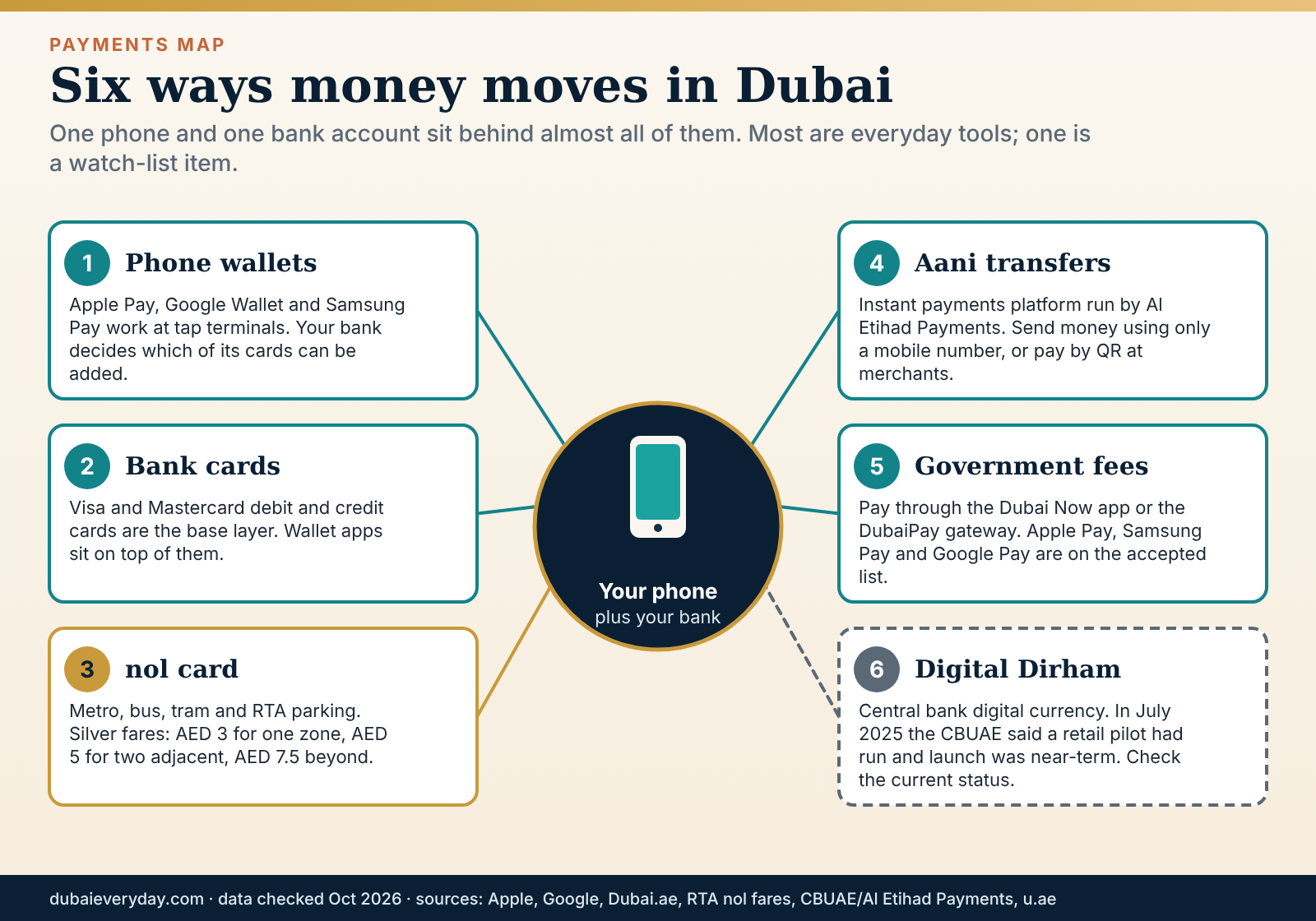
Phone wallets for internet mobile Dubai: what Apple and Google say
Apple’s support page for the UAE lists about 50 participating issuers, including major banks and several fintech and payment brands, and warns that some cards from participating banks may not be supported. Google’s Wallet help page for the UAE lists cards from many banks and fintech providers, says the bank decides which of its cards can be added and notes that contactless payment needs an Android phone with NFC. The Dubai government’s payments page lists Samsung Pay among the accepted wallets for government fees.
The practical internet mobile Dubai advice is short. Add your main card first, then a second card from a different issuer, so that a bank outage or a lost card does not leave you stuck at a till. If a card will not add, call the number on the back of it, as Google’s page advises, rather than trying repeatedly. Keep a physical card for the occasions when a terminal or battery fails.
nol: transport and parking, with the arithmetic
The RTA’s fares page lists nol card types and fares in dirhams by zones travelled. A Silver or Personal card pays AED 3 for one zone, AED 5 for two adjacent zones and AED 7.5 for more than two.
A Gold card pays AED 6, AED 10 and AED 15, and the Gold surcharge applies on tram and metro only. A Red Ticket single trip costs AED 4, AED 6 or AED 8.5. Children aged five and under travel free. Balances on reloadable cards can also pay for RTA parking by tapping at a parking meter.
Our calculation: when does a pass pay off?. The RTA page gives one pass example: a 30-day Silver pass for all zones at AED 350. Divided by the AED 7.5 three-zone fare, that is about 47 one-way trips in 30 days to break even, or roughly 23 days of return commuting. At the AED 5 two-zone fare it takes 70 trips, and at the AED 3 one-zone fare about 117. So the pass only pays for people who cross three or more zones almost every working day. Confirm current pass prices on the RTA site; this is arithmetic on one listed example.
That calculation is why we suggest starting with a pay-as-you-go Silver card and reviewing after your first month’s trips. The Dubai Metro guide has station and line detail, and the RTA’s nol Pay app, described on its site as the official commuting app, can be checked for its current features before you rely on it.
Aani: instant transfers by mobile number
Aani is the UAE’s instant payments platform, announced on 16 October 2023 by Al Etihad Payments, a subsidiary of the Central Bank of the UAE. According to the launch release, you can send money using only the recipient’s mobile number, request money, split bills and pay by QR code at merchants, with real-time direct debit and e-cheques listed as planned features. It is reached through participating financial institutions or the Aani mobile app. The release did not mention fees, and availability differs by bank, so check your own bank’s app.
For a new arrival, Aani’s value in internet mobile Dubai life is everyday: paying a friend, splitting a bill or sending rent-related deposits without waiting for a transfer to clear. It does not replace the formal channels for large or regulated payments, which keep their own receipts and confirmations.
Government fees: Dubai Now and DubaiPay
The Dubai government’s wallet page says fees can be paid with various international digital wallets at government service centres, and that several wallets are accepted online through the DubaiPay gateway and the Dubai Now app. The list includes Apple Pay, Samsung Pay and Google Pay, as well as Alipay, WeChat Pay, RuPay, Diners, Discover, China UnionPay, NPCI QR (UPI) and tap-to-pay on a phone.
The page was last modified on 3 February 2026 and said activation of all listed wallets was expected by the end of 2025, so not every wallet may work everywhere. Ask at the counter before relying on an unusual one.
Digital Dirham: a watch-list item
The Central Bank said on 31 July 2025 that it was preparing for an official launch of the Digital Dirham “in the near term”, that a cross-border application was live and that a real-value retail pilot had been carried out. It gave no launch date. We did not find a later official statement on the pages we could read, so we cannot say whether a consumer version is available. Treat any app or message offering to “convert” money into Digital Dirham with suspicion until the Central Bank itself announces how consumers can use it.
Buy now, pay later and fintech cards
Tabby and Tamara appear among the issuers on Apple’s and Google’s UAE lists, alongside payment fintechs and banks, which shows that instalment products now sit inside phone wallets. Instalment credit is still credit. Read the repayment schedule and late-fee terms, avoid stacking several instalment plans at once and ask how refunds on returned items are handled before you buy. For complaints about licensed financial institutions, the government’s reporting page points to the Central Bank’s Sanadak service.
If you are visiting: a light internet mobile Dubai kit
A foreign card in a phone wallet will work wherever contactless acceptance and your card issuer allow it. Before you fly, check your issuer’s foreign-transaction fees and daily contactless limits, and tell the bank you are travelling to avoid a block. Carry one physical card and a little cash, then use the Dubai travel guide for what to budget for in a short trip.
Scams, security and privacy
Because so much in internet mobile Dubai life runs on a phone number, a one-time code and a government login, the stakes of a mistake are higher than the convenience suggests. The good news is that scam messages follow a few patterns. Learn the patterns and you can ignore nearly all of them without reading further.

The four tells of an internet mobile Dubai scam text
First, a sender name that imitates an authority. Sender names can be faked, so a name that looks official proves nothing. Second, pressure: a short deadline and a penalty for missing it. Genuine processes give you a reference and time. Third, a link that does not sit on an official domain.
Government services use addresses such as u.ae and dubai.ae, so type the address yourself or open the official app. Fourth, a request for card details or a one-time code. A code is a key to your account and no genuine service needs you to read it aloud.
The government’s cyber-safety page adds two supporting resources: a browser plug-in called RZAM that scans links and blocks phishing sites, and a Cyber Pulse awareness initiative. It also says victims of electronic fraud should report immediately and must not give in to threats.
Where to report an internet mobile Dubai scam
The government’s economic-crime reporting page lists the routes. The Dubai Police eCrime platform at ecrimehub.gov.ae takes cyber-enabled financial crimes and scams. Your local police station can take general fraud reports. The Economic Security Center of Dubai accepts reports of economic crimes through its website. The Central Bank has a whistleblowing channel for fraudulent emails or posts impersonating it, and Sanadak handles complaints against licensed financial institutions and insurers over misleading or fraudulent behaviour that caused a loss. The page lists no dedicated scam hotline, and the only number tied to crime is 999.
Your SIM and your Emirates ID are part of your security
A registered SIM is a recovery route for many accounts, so someone else holding a SIM in your name is a real risk. That is why Hesabati exists, and why we suggest checking it once a year.
Share your Emirates ID only where a genuine legal or contractual reason exists, and ask what the copy is for and how long it will be kept. The UAE’s personal data protection law, Federal Decree Law No. 45 of 2021, generally requires consent for processing personal data and gives you rights to ask for corrections and to restrict processing, according to the government portal.
The same portal says the UAE Data Office oversees the law and that the consumer protection law of 2020 prohibits suppliers from using consumer data for marketing. These are summaries, not legal advice; the legal basics guide and the official texts are the place to verify detail. In everyday terms, and as our reading rather than legal advice: you may refuse unnecessary data requests, you may complain if a company ignores consent, and you are not obliged to accept marketing built from data you never agreed to share.
Public Wi-Fi and shared networks in internet mobile Dubai life
Avoid banking, UAE PASS sign-ins and any app that needs a one-time code on an open Wi-Fi network you do not control. If you have a data plan, use it for sensitive tasks, or share a hotspot from your own phone. Confirm the exact network name with the venue before joining, because lookalike names are a known trick. Switch off automatic joining of open networks, and sign out of shared computers fully.
A first-hour plan if internet mobile Dubai security goes wrong
- Stop the loss.Call your bank from the number on the back of your card or in its official app. Ask it to block the card and to hold or recall any transfer.
- Secure your accounts.Change passwords on the accounts that use the same phone number or email, starting with email and banking. Log out other sessions.
- Tell your operator.If you lost service unexpectedly or your SIM may have been swapped, contact your provider immediately and file a complaint, as the TDRA FAQ advises for unauthorised SIMs.
- Report it.Use the eCrime platform, or go to a police station. Keep screenshots, phone numbers and transaction references.
- Follow up.If a licensed financial institution handled your complaint badly, the government’s reporting page points to Sanadak.
Families, children and older relatives online
A household changes the shape of the internet mobile Dubai problem. More people need registrations, more devices share one router, and the people at the edges, small children and older relatives, are the ones most affected by both the new rules and the scams. The UAE also now has a dedicated child digital safety law, which is worth understanding before you hand anyone a tablet.
Internet mobile Dubai child safety: what the rules say
The government’s children’s digital safety page names Federal Decree-Law No. 26 of 2025 on Child Digital Safety, and a Cabinet resolution of 2026 on children’s access to social media that is available in Arabic only. According to the page, children under 15 may not create, use or operate personal social media accounts, nor use full features such as posting, commenting, sharing or joining public groups. Platforms must enforce this with technical and control measures, and will be classified by risk, which sets the age groups and verification methods for each.
On personal data, the page says collecting or using the data of children under 13 is prohibited unless a parent or guardian gives clear, easily withdrawn consent, the purpose is explained and the data is not used for targeted advertising or commercial purposes.
Platforms must provide strong default privacy settings, parental controls, age-based content ratings, daily usage limits and rest periods, and easy reporting tools. Internet service providers must filter harmful content, provide parental control tools and report content that may harm children. For games, parents can check content and risks on the Sannif platform at sannif.ae.
What that means for a parent (our reading)
Do not wait for enforcement to do the work. Expect age checks to start appearing on platforms, but treat them as a second line of defence and keep your own controls. Ask your operator which parental-control tools it provides on the home line and on children’s mobile lines, since the law places that duty on providers. Use the device’s own settings for app approvals and screen time. Agree house rules on where devices live at night, which matters more than any filter.
If a child is distressed by what they have seen online, the government’s cyber page lists the UAE Digital Wellbeing Support Line on 80091, an Arabic-language service offering family guidance on digital issues. The children’s page lists no dedicated child online-safety hotline and points to platforms’ own reporting tools for harmful content, with 999 for emergencies. Our guides to Dubai with kids and schools in Dubai cover the wider family logistics.
Internet mobile Dubai lines, devices and the home network
Every adult needs their own registration, and each person’s SIM registration sits under their own identity. Ask the operator what is required for a child’s line rather than assuming, because we could not verify the rule on the pages we read. At home, create a separate guest network for visitors and for smart devices such as cameras and TV sticks. Change the default password on any router, camera or baby monitor the day you plug it in; those are the devices most often left on factory settings.
The e& Neo page caps connected devices at 25. A family with phones, tablets, consoles, watches, speakers, plugs and cameras can reach that number sooner than expected. Count your devices before you choose a plan, and ask the operator whether the cap is enforced or just a guide. Our baby guide has a sensible view of monitors and Wi-Fi gadgets in a small flat.
Older relatives: visiting or living with you
Older relatives are most exposed to the pressure tactic in the scam pattern, because a message that threatens a fine or a blocked account feels urgent. A short sit-down session helps more than any app. Walk through the four tells, agree that nobody reads out a code on a call, and agree that any message about money gets shown to someone else first. For a visiting parent, a visitor line from a licensed operator is enough, and the passport is the registration document.
For video calls home, test the approved options before the visit starts, because internet calling rules mean the app the relative uses at home may not work here. If a long-stay parent needs UAE PASS for services, the Digital Identity support line is 600 561 111 around the clock, according to ICP, and the account levels earlier in this guide explain what a basic account cannot do.
Three worked budgets for internet mobile Dubai
These scenarios turn the verified internet mobile Dubai prices into annual totals. They are deliberately simple, built only from figures printed on the operator pages we read, and every number should be re-checked before you sign. All totals are before 5% VAT unless stated, and none of them is a quote.
Illustrative example (not a quote or market fact). The internet mobile Dubai scenarios use e& headline and plan-page figures as building blocks: prepaid SIM AED 40 with AED 40 credit, prepaid from AED 30 a month, postpaid from AED 100 a month, Neo fibre AED 399 a month with a three-month 20% offer, and Home Wireless Advance at AED 206 for three months then AED 229. Real plans differ in data, minutes and terms, so use the arithmetic as a template for your own offers.
Scenario 1: single resident, light mobile use, 5G home internet
Mobile: the AED 40 SIM, whose AED 40 of credit we assume covers the first month, then eleven months at AED 30 gives AED 40 + AED 330 = AED 370. Home: Advance for twelve months is three months at AED 206 and nine at AED 229, which is AED 2,679. The twelve-month total is AED 3,049 before VAT, about AED 3,201 with VAT, or about AED 267 a month. If the person moves flat mid-year, the free relocation call to 101 keeps the connection, which is the attraction of this setup.
Scenario 2: couple, fibre and two postpaid lines
Home: Neo for twelve months is AED 4,548 after three months at the offer price. Mobile: two lines at the AED 100 headline for twelve months is AED 2,400. The total is AED 6,948 before VAT, about AED 7,295 with VAT, or roughly AED 608 a month. The AED 100 figure is a starting price, so real lines with more data cost more. The strongest saving here is not on price but on discipline: check the plan after the promotion ends, because the standard price returns and the bill rises with it.
Scenario 3: the cost of leaving early
Suppose someone takes the 24-month Home Wireless Premium plan and leaves Dubai after ten months. On the printed terms, the early-termination charge is the lower of AED 1,000 or one monthly charge, which is AED 299, plus any router balance. Fourteen remaining months at the AED 299 standard price would have cost AED 4,186, so the exit rule is far cheaper than paying out the term. Compare that with a visitor line, which at the AED 49 headline costs less per month than a single month of early-termination charge on a home plan.
The lesson across the three internet mobile Dubai scenarios is that the monthly price is only one lever. The contract length, the post-promotion price and the exit rule matter as much, and they are cheaper to read before you sign than to discover afterwards. For the wider monthly picture, see the cost of living guide.
Common mistakes and how to fix them
Most problems in internet mobile Dubai life are small and repeatable. The table below pairs the symptoms most often covered in official and operator documentation with the likeliest cause and the first thing to try. It is a starting point for diagnosis, not a guarantee that any given fault is explained.
| Symptom | Likely cause | First fix |
|---|---|---|
| Outgoing calls fail, incoming still work | Registration data expired and the 60-day suspension has started | Update registration through the operator app, branch or UAE PASS |
| Calls on a messaging app will not connect | Unlicensed VoIP blocked by the licensee | Use a normal call or an approved service; check the TDRA list |
| Number port stuck or rejected | Incomplete or mismatched details, or a suspended line | Match the name and Emirates ID exactly and clear any suspension |
| eSIM will not install | Weak connection, old software, low battery, QR scanned on the wrong device | Use stable Wi-Fi, update, charge above 50% and scan on the target phone |
| Wi-Fi slow, cable fast | Router position or interference | Move the router to a central open spot, or run Ethernet |
| Government app keeps asking to verify | UAE PASS account is at the Basic level | Complete Emirates ID verification in the app |
| Legitimate site blocked | Filtering error | Use the block-page link to notify the provider, or the TDRA block service |
| Flood of marketing texts | Promotional senders without valid consent | Text BALL to 7726, then complain to your provider |
Signing a long contract before the Emirates ID exists
The fix is a visitor line for the interim weeks. It costs little, it is a short and defined commitment, and it keeps you free to choose the right plan once you can register as a resident. Rushing a postpaid plan on a temporary document is the single most expensive avoidable error in this guide.
Forgetting the lapse clock
People assume a SIM is permanent. It is a registration with an expiry, and the Emirates ID date drives it. Put the card’s expiry in your calendar six months out, and update the registration the week you renew the card. If service has already stopped, remember that the TDRA says it can be restored within 90 days of expiry.
Auto-renewing visitor plans and no refunds
A 28-day plan that renews itself is a trap for a ten-day trip. Check renewal settings the day you buy, calendar the end date, and remember that the operator page says purchased plans are not refunded, including when you change or unsubscribe.
Trusting speed claims over the cable test
When Wi-Fi feels slow, plug a laptop into the router with an Ethernet cable and test. If the cable is fast, the plan is fine and the problem is placement, interference or the device. If the cable is also slow, you have a case for the operator. Note the time and result before you call, because support will ask.
Tapping the link in the message
The scam text in this guide works because it removes the pause. Build the pause back: close the message, open the official app and look there. Real fines, bills and renewals appear in the real app.
Closing an internet mobile Dubai home plan late
When you leave, tell the operator before you go, not after. e& asks postpaid and home customers to call 800-6665 at least 48 hours before leaving. For 5G home plans, remember that the service is locked to an address, so a move needs the relocation call, and cancelling is cheaper inside the stated penalty-free window than outside it.
Start here: an internet mobile Dubai action list
If you have skimmed to this point, the sections above reduce to three short lists. Pick the one that matches your situation and do those items in order. Each list is our reading of the rules and prices on this page, so check the linked sources if a detail matters to you.
If you land next week: the internet mobile Dubai short list
- Unlock the phone, check eSIM support and decide between a travel eSIM and an operator visitor line
- Keep your passport details to hand, because a visitor line registers against the passport
- Put a wallet card on the phone and carry a physical backup
- Calendar the end date of any auto-renewing visitor plan, since purchases are not refunded
- Plan calls home around the VoIP rules instead of assuming your usual app will connect
If you are moving here: the internet mobile Dubai long list
Treat the Emirates ID as the milestone for your whole internet mobile Dubai setup. Until it arrives, stay on a flexible visitor line. When it arrives, register a resident line, verify UAE PASS to the verified level and check Hesabati for numbers in your name. Once the tenancy is signed, check which operator’s fibre reaches the building and read the contract length, the price after promotions and the exit rule before you order. Then add a second wallet card, a nol card and instant transfers through your bank app.
If you already live here
- Check Hesabati once a year, and after any time you handed over an Emirates ID copy
- Put the Emirates ID expiry in your calendar and update SIM registration data before it lapses
- Review your home plan the month the promotion ends, because the standard price returns
- Test your backup connection once, including the tools you use for work
- Agree a household rule for scam messages: nobody reads out a code, and money requests are shown to a second person first
That is the whole of internet mobile Dubai in practice: a handful of registrations done in the right order, a few contract terms read before signing and one habit of pausing before you tap. Everything else on this page is detail in support of those three ideas.
FAQ
What is the best internet mobile Dubai setup for a new arrival?
Start with a visitor line or travel eSIM for the first days, then move to a resident line once your Emirates ID exists, verify UAE PASS, and order home internet after your tenancy is signed. That order avoids signing a long contract on a temporary document. Check which operator’s fibre serves your building before you order. Our reading of the official pages is that the plan matters less than the sequence, because registrations feed each other.
Is e& or du better in Dubai?
We cannot rank them for internet mobile Dubai plans, and nothing on the official pages supports a universal winner. Both are licensed for landline, mobile and internet, and both publish coverage maps, according to the government portal. What decides it for you is which operator’s fibre reaches your building, the price after promotions and the contract terms. Numbers can move between them at no porting fee, so a wrong first choice is not permanent. We could read e& plan pages but not du’s plan pages, so compare du directly.
Can tourists buy a SIM card in Dubai?
Yes. For a short-stay internet mobile Dubai kit, the TDRA says visitors register a SIM with a passport (a GCC national ID for GCC citizens) and can hold up to two SIMs per provider for a limited period. e& sells visitor line packs valid for 24 hours, 48 hours, 7, 14 or 28 days, with a one-time AED 57.75 connection fee that is waived online. Buying online needs a 3D Secure card; in person you need a valid passport and visa. Check auto-renewal and the no-refund rule before you buy.
Do WhatsApp and FaceTime calls work in Dubai?
The TDRA says unlicensed voice over IP is generally not permitted and that licensed operators must block it, and it publishes a list of approved applications. It does not name consumer apps. Vendor guides say calls on several popular apps are blocked while text messaging works, but those are vendor claims. The safest approach is normal mobile calls, an approved service for calls abroad and a test before any important call. Rules and blocking can change, so check the TDRA’s list.
Is a VPN legal in the UAE?
In internet mobile Dubai life it depends on the use. The TDRA internet guidelines say using proxies or VPNs to reach prohibited content falls under “bypassing blocked content”, that hosting VPN services to serve UAE users and bypass filtering is not allowed, and that companies, institutions and banks may use VPNs for internal networks. Offences and penalties sit in the cybercrime law, Federal Decree-Law No. 34 of 2021. This is general information, not legal advice, and a lawyer can advise on a specific case.
How much does home internet cost in Dubai?
For internet mobile Dubai budgeting, e&’s own pages show 5G home wireless at AED 206 a month for three months then AED 229 on a 12-month commitment, and Neo fibre is AED 399 a month with an online offer of 20% off for three months, also on a 12-month commitment, all before 5% VAT. The top fibre tier is AED 1,799 a month on 24 months. We could not read du’s prices. Our home internet guide compares operators and building availability.
How do I get an eSIM in Dubai?
For e&, you subscribe at an outlet, in the e& UAE app or online, get a QR code and scan it on the phone that will hold the eSIM; an existing number is converted in the app, which deactivates the physical SIM. For du, existing customers can order in the du app and verify with UAE PASS, with a listed activation fee of AED 55 prepaid or AED 125 postpaid plus VAT. Check that your phone supports eSIM and install on stable Wi-Fi.
Can I keep my number if I change from du to e&?
Yes for the mobile prefixes the TDRA lists (050, 052, 054, 055, 056 and 058). There is no porting fee charged to the customer, and the process usually takes under one working day. You register with the new operator, receive a new SIM with the same number and lose any remaining prepaid credit and contacts stored on the SIM. Premium package holders cannot port during their first contract, and unpaid dues can lead to disconnection.
How many SIM cards can I register in Dubai?
For internet mobile Dubai registrations, the TDRA FAQ says visitors can register up to two SIMs per provider and residents up to five per provider. e&’s visitor line is limited to two per passport. Registration uses the original Emirates ID for residents and the passport for visitors. Use Hesabati, the TDRA service that lists numbers registered under your Emirates ID, to check that nothing unfamiliar is attached to your name, and report unauthorised SIMs to your provider immediately.
What is UAE PASS and do I need it?
UAE PASS is the national digital identity and signature app, launched in 2018, and it sits underneath much of internet mobile Dubai life. It gives you one login for government and some private services and lets you sign documents digitally. Residents need it for many tasks, including Hesabati and the TDRA dispute service. Its developer documentation describes Basic, Advanced and Qualified levels; verified levels need an Emirates ID check. The support line, per ICP, is 600 561 111. Visitors without an Emirates ID should not expect a verified account.
Does Apple Pay work in Dubai?
Yes, with participating issuers, and it belongs in any internet mobile Dubai payments setup. Apple’s UAE page lists about 50 banks and payment providers and notes that some cards from participating banks may not be supported. Google Wallet and Samsung Pay are also supported, with Google noting that the bank decides which cards can be added. The Dubai government also lists these wallets for paying government fees via DubaiPay and the Dubai Now app. Check with your own bank, and carry a physical card as a backup.
How do I report an online scam in Dubai?
The government’s reporting page points to the Dubai Police eCrime platform at ecrimehub.gov.ae for cyber-enabled financial crimes and scams, and to your local police for general fraud. The Economic Security Center of Dubai takes reports of economic crimes, and Sanadak handles complaints against licensed financial institutions and insurers. Call your bank first if money or a code has gone, and keep screenshots. The only number the page ties to crime is 999.
What happens to my phone line when I leave Dubai?
On e&, postpaid and home customers are asked to call 800-6665 at least 48 hours before leaving so the balance and exit fees can be checked; the line is then disconnected immediately. Prepaid customers can buy a Homebound Pack, listed at AED 105, AED 420 or AED 630 including VAT, to hold the number for 30 or 60 days. When the pack expires the number returns to e&. Close your home plan and utilities separately.
Do I need a different internet mobile Dubai setup for kids?
You need more controls rather than a different plan. The government’s child digital safety page says under-15s may not operate personal social media accounts, that platforms must offer parental controls and that internet service providers must filter harmful content and provide parental control tools. Ask your operator which tools it offers, use device settings for screen time and change default passwords on cameras and monitors. For an upset child, the Digital Wellbeing Support Line is 80091.
Related reading
Sources and further reading (39 links)
- TDRA: Frequently asked questions — SIM registration, SIM limits, VoIP, spam, blocking
- TDRA: Porting numbers — mobile and fixed number portability rules
- TDRA: Internet guidelines — prohibited content categories, VPN and VoIP position, unblock route
- TDRA: Digital infrastructure and the digital economy — fibre penetration, operator licence renewals
- TDRA: Starlink licence announcement — scope and conditions of the licence
- TDRA: Dispute resolution with service providers — complaint escalation and timelines
- TDRA: Hesabati — checking numbers registered under your Emirates ID
- TDRA: Telemarketing and voice spam — Do Not Call Registry short codes
- UAE Government portal: Telecommunications — operators, Kashif, Hesabati, telemarketing resolutions
- UAE Government portal: Cyber safety and digital security — RZAM, Cyber Pulse, Digital Wellbeing line
- UAE Government portal: Reporting economic crimes — eCrime, ESCD, Sanadak, CBUAE channels
- UAE Government portal: Children’s digital safety — Child Digital Safety law summary
- UAE Government portal: Data protection laws — Federal Decree Law No. 45 of 2021 summary
- UAE Government portal: The UAE Pass — what UAE PASS is and how it launched
- UAE Government portal: Emirates ID — who needs it, renewal, loss and late fees
- ICP: UAE Pass — registration steps and support line
- UAE PASS developer documentation: User account types — Basic, Advanced and Qualified levels
- ICP: One-year Emirates ID renewal window — July 2026 change
- ICP: Emirates ID issuance service — fees, time and requirements
- e& UAE: Home page — headline prepaid, postpaid and visitor prices
- e& UAE: Prepaid plans — SIM price, packs and validity
- e& UAE: Postpaid plans — plan families and promotions
- e& UAE: Visitor line plans — fees, caps and purchase rules
- e& UAE: Visitor line overview — validity, activation and top-up
- e& UAE: eSIM activation — activation steps
- e& UAE: Leaving the UAE — cancellation and Homebound Packs
- e& UAE: Neo home plan — fibre price, speed and terms
- e& UAE: Home Wireless — 5G home plans and conditions
- e& UAE: Giga 5G plan — top-tier fibre terms
- du: eSIM — activation, fees and conversion
- Dubai Now — categories and number of services
- Dubai.ae: Payment using digital wallets — wallets accepted for government fees
- RTA: Nol fares — card types, fares and a pass example
- RTA: Digital services — RTA Dubai app, S’hail, nol Pay
- Apple Support: Apple Pay participating banks — UAE issuer list
- Google Wallet Help: Supported payment methods, UAE — banks and NFC requirement
- Central Bank of the UAE / Al Etihad Payments: Aani launch — features and operator
- Central Bank of the UAE: Digital Dirham progress report release — launch status
- Simology: UAE eSIM guide (vendor blog) — context only on app-call restrictions and visitor eSIMs; not a primary source
Update log: 29 October 2026 — first publication; all facts re-checked against the sources above. Next review due: April 2027 (six-month cadence), or sooner after any change to SIM registration, VoIP, Emirates ID or operator plan rules. Corrections welcome. This page is general information, not legal, financial or individual telecom advice, and prices are operator figures that change.
About DubaiEveryday and this guide
DubaiEveryday.com is an independent editorial project that publishes practical, research-based guides to everyday life in Dubai: where to live, what things cost, how the rules work and how to get around. This page was written and edited by the DubaiEveryday editorial team. It is not signed by a named expert, doctor, lawyer or adviser, and we do not claim first-hand testing of a venue, clinic or service unless the page says so.
Each guide is built from official sources such as government and regulator pages, operator websites and established news outlets, cross-checked where we can. When we could not confirm something, we say so in the text, and examples that use made-up numbers are labelled as illustrations. Mentions are editorial choices, not paid placements, and a link is not an endorsement.
Dubai changes quickly. If you spot something that is out of date or wrong, please tell us through the contact options on DubaiEveryday.com and we will check it and correct the page.